← Back to library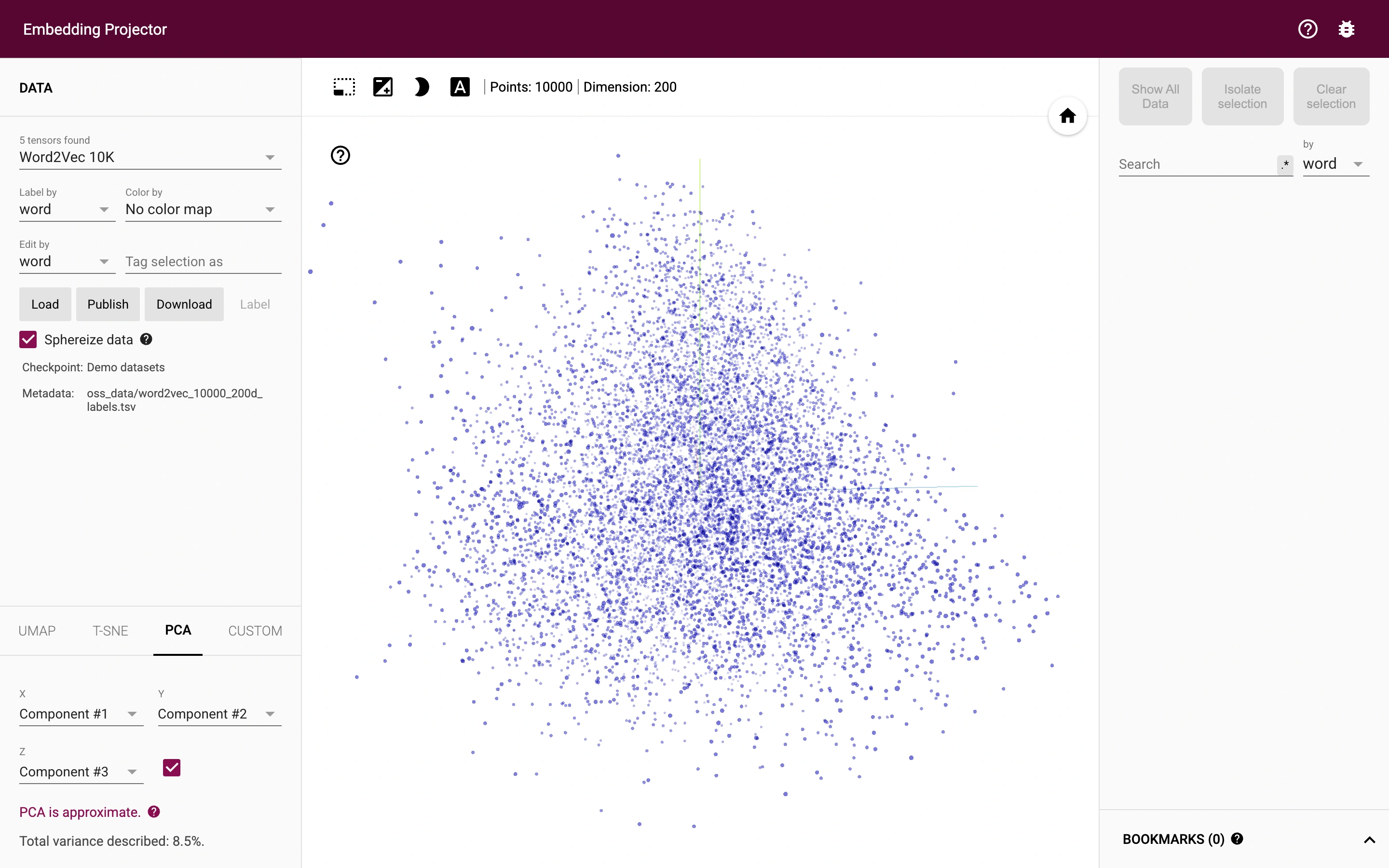
Viewport capture · opening screen Assembled in your browser. No API key or AI request needed. Changing the fields refreshes the preview.
Embedding Projector — Vector exploration
Dev ToolsSee it liveprojector.tensorflow.org
An embedding explorer displays a built-in word-vector dataset as a three-dimensional point cloud.
Why this pattern works
Keep data and projection controls beside a large explorable visualization, with search separate on the right.
Design notes
- Surface
- An embedding explorer displays a built-in word-vector dataset as a three-dimensional point cloud.
- Navigation
- A left panel selects data and projection methods; a right panel provides search and selection tools.
- Layout
- The central point cloud dominates the viewport between narrow control panels.
- Density
- Dense controls around a large visual analysis surface.
- Color
- White canvas, purple points and a dark burgundy header.
- Type
- Compact technical labels and numerical metadata.
- Pattern
- Keep data and projection controls beside a large explorable visualization, with search separate on the right.
- States
- Built-in word-vector demo dataset; no private data loaded or published.
- Don't
- Adapt the layout to your own product and supported capabilities; write your own examples and keep important actions clearly labeled.
Make it your own
Turn this reference into a useful brief for your project. Copy it into the AI tool you already use.