← Back to library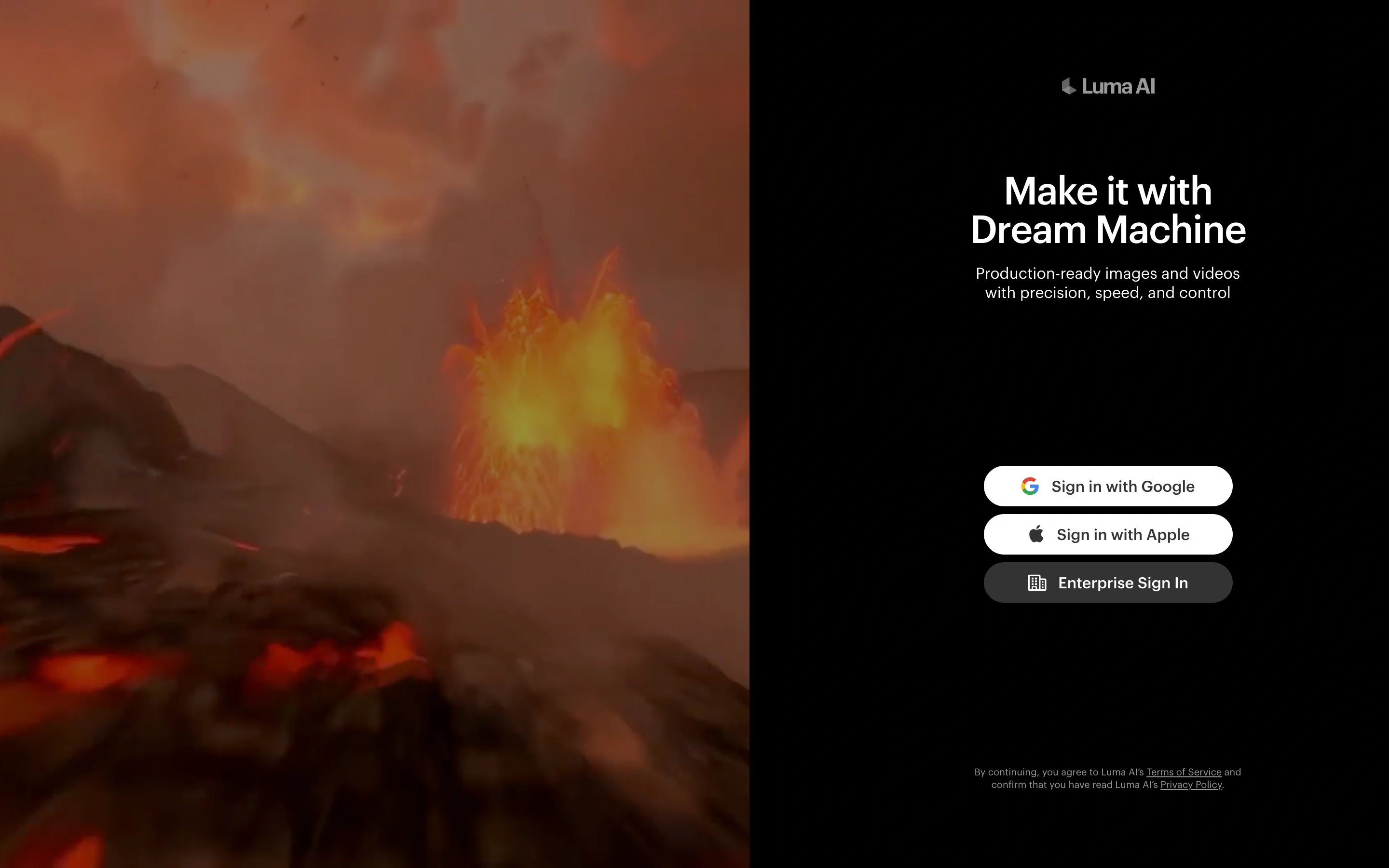
Viewport capture · opening screen Assembled in your browser. No API key or AI request needed. Changing the fields refreshes the preview.
Luma Dream Machine — Sign in
Forms & OnboardingSee it livedream-machine.lumalabs.ai
A creative-AI sign-in screen pairs immersive media with a compact authentication panel.
Why this pattern works
Use product imagery to establish context while keeping authentication choices easy to scan.
Design notes
- Surface
- A creative-AI sign-in screen pairs immersive media with a compact authentication panel.
- Navigation
- A small brand mark precedes the entry options.
- Layout
- Large cinematic imagery fills the left side; a black right column holds a short introduction and provider buttons.
- Density
- Sparse, with three clearly grouped sign-in options.
- Color
- Warm cinematic footage, black background and white buttons.
- Type
- Simple sans-serif heading and compact supporting copy.
- Pattern
- Use product imagery to establish context while keeping authentication choices easy to scan.
- States
- Public Google, Apple and enterprise sign-in choices; no authentication performed.
- Don't
- Adapt the layout to your own product and supported capabilities; write your own examples and keep important actions clearly labeled.
Make it your own
Turn this reference into a useful brief for your project. Copy it into the AI tool you already use.