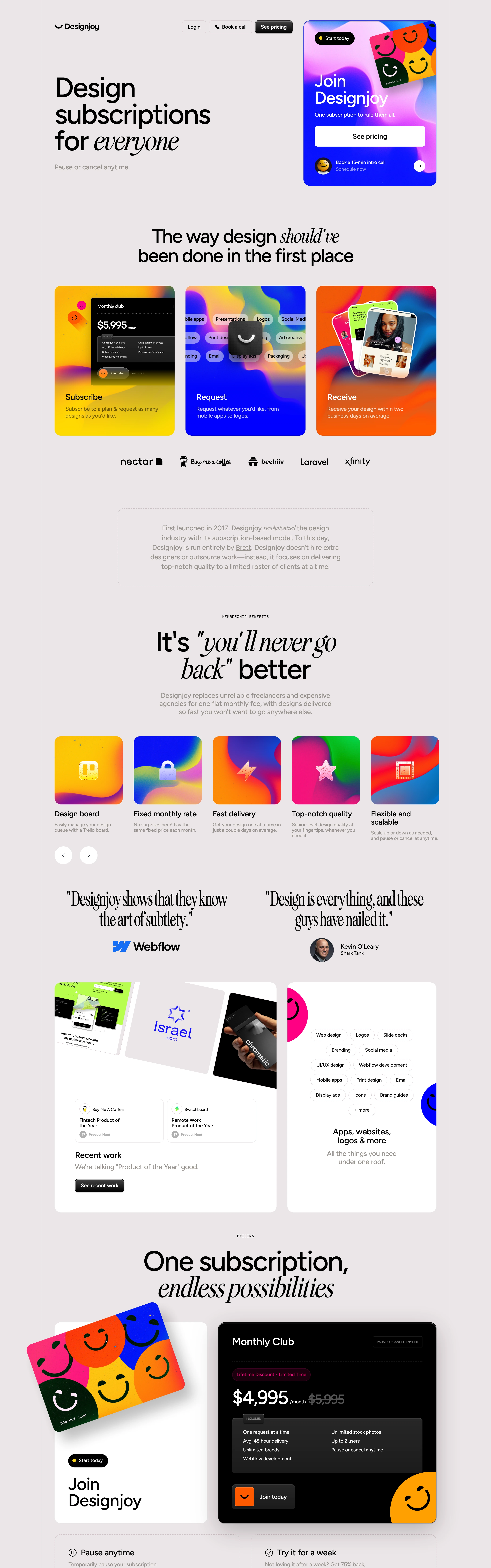
Confident, high-margin, a little cheeky. A one-person premium service that doesn't need to over-explain itself.
Colors
Light neutral-gray base (#F2F0EE), near-black text (#141414), and saturated gradient cards in warm yellow-orange (#F5A623→#F0568C), electric blue-purple (#4B3FF2→#EC4899), and lime-green-to-pink — plus a solid black pricing card (#0D0D0D) with an orange CTA (#FF5C29).
Type
A heavy grotesque sans (like a bold Neue Montreal or Söhne) for headlines, mixed with an italic serif (like a Georgia or Tiempos italic) on single emphasis words within the same headline for contrast.
Layout
Left-aligned hero headline beside a tilted gradient promo card top-right; below, a 3-up gradient-card grid explaining the subscribe/request/receive flow; long-form sections alternate centered short headlines with wide feature-card rows and testimonial pull-quotes.
Motion
Subtle card tilt/parallax on the hero promo card, hover-lift on gradient cards; otherwise mostly static and confident, no heavy scroll choreography.
Texture
Smooth painterly gradient fills (no grain), soft rounded corners on every card, thin black borders on white content cards for definition against the gray field.
Imagery
Generate: abstract smooth gradient-blob backgrounds (yellow-to-orange, blue-to-purple, green-to-pink) with a simple smiley-face motif overlaid, used as flat card backgrounds. Tool: kie-ai Flux or nano-banana for the gradient textures; keep smileys as simple line-drawn overlays, not photoreal.
Don't
No dark-mode-only palette, no thin/light-weight headline type, no photography-heavy hero — the gradients and type carry the whole page.
Make it your own
Turn this reference into a useful brief for your project. Copy it into the AI tool you already use.
Add constraintsPreview & edit promptAssembled in your browser. No API key or AI request needed. Changing the fields refreshes the preview.