← Back to library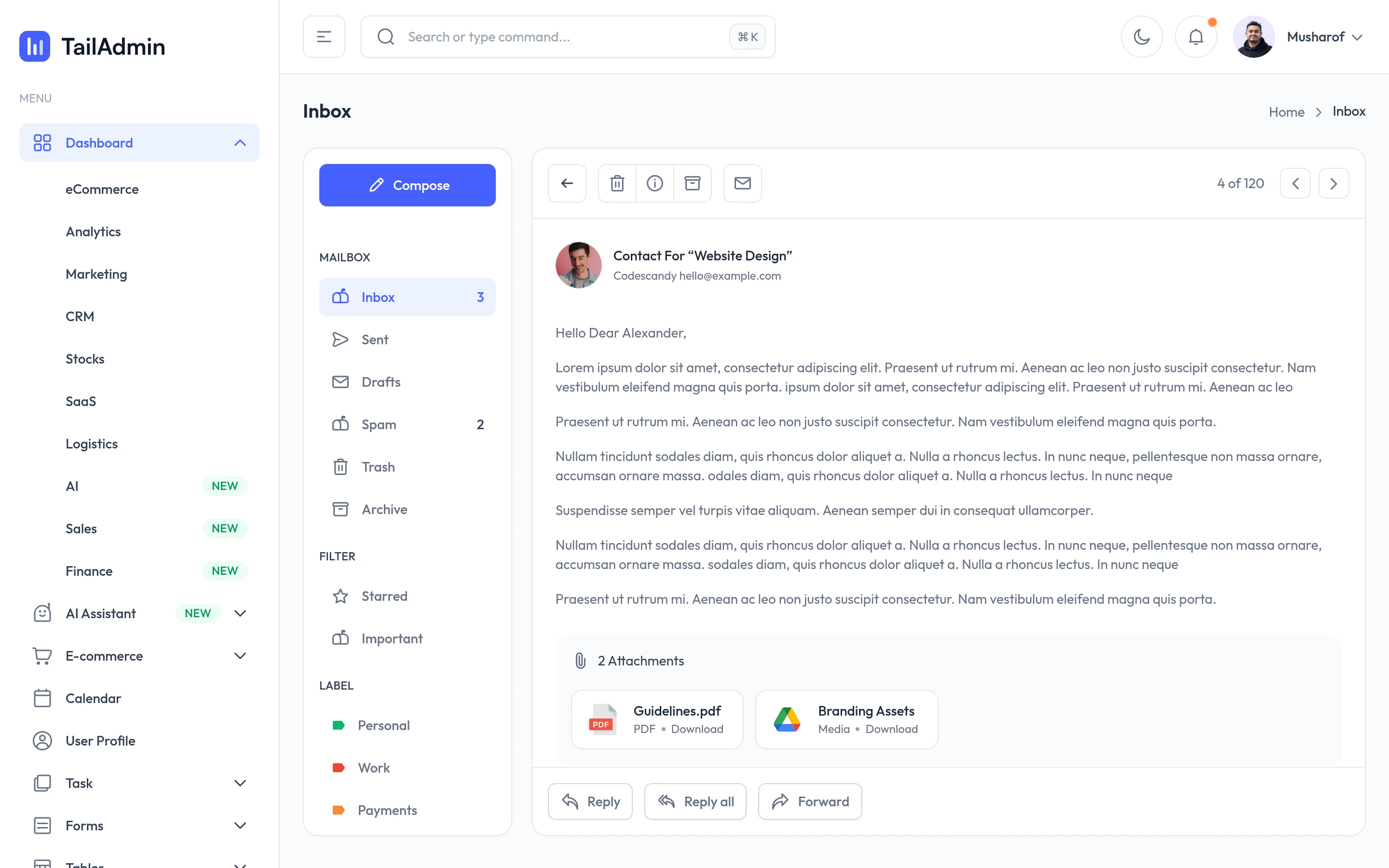
Viewport capture · opening screen Assembled in your browser. No API key or AI request needed. Changing the fields refreshes the preview.
TailAdmin — Inbox details demo
Email & MessagingSee it livedemo.tailadmin.com
An opened message displays its sender, body, attachments and reply actions while mailbox navigation remains visible.
Why this pattern works
An opened message displays its sender, body, attachments and reply actions while mailbox navigation remains visible.
Design notes
- Surface
- TailAdmin — Inbox details demo
- Navigation
- App sidebar and folder column beside a message reading pane.
- Layout
- App sidebar and folder column beside a message reading pane.
- Density
- Compact supporting controls preserve space for the primary content.
- Color
- White, pale gray and violet
- Type
- Clear sans-serif labels with stronger section headings and smaller metadata.
- Pattern
- An opened message displays its sender, body, attachments and reply actions while mailbox navigation remains visible.
- States
- Public example or template in its captured initial state; visible sample data is demonstration content.
- Don't
- Use the structure as a reference, with your own content and identity. This still does not establish the behavior of controls or unseen states.
Make it your own
Turn this reference into a useful brief for your project. Copy it into the AI tool you already use.