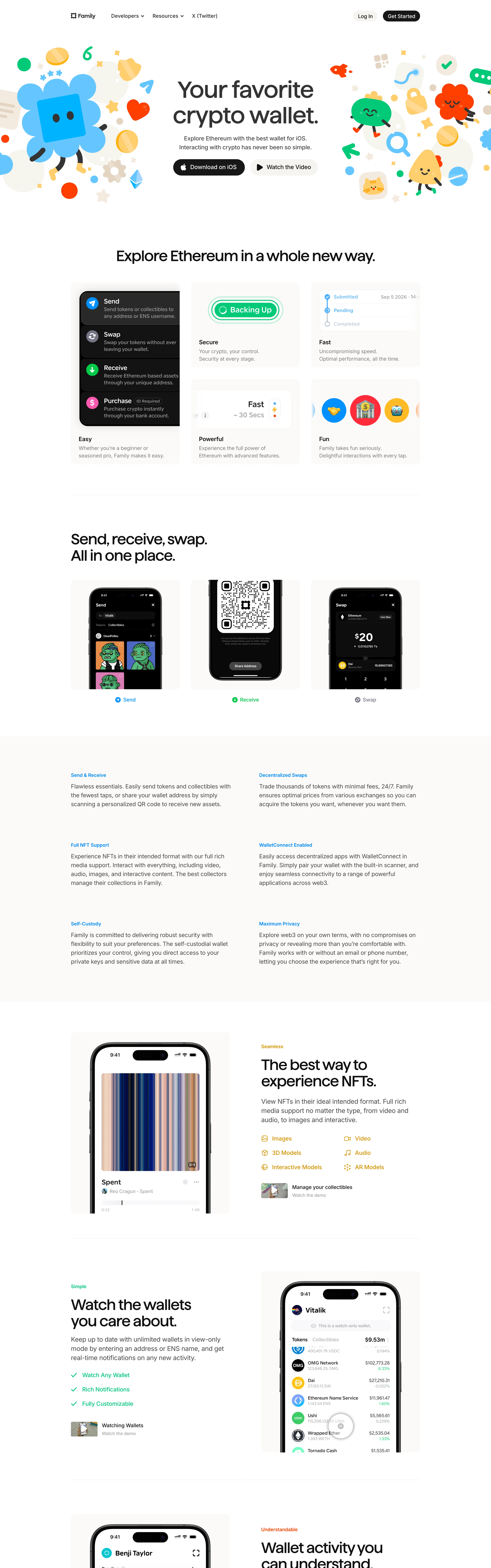
Warm, delightful, disarming. Takes an intimidating category (crypto) and makes it feel like a friendly toy — confident enough to be cute without losing product credibility.
Colors
Pure white canvas with soft warm-grey section bands (#F7F5F1) for card clusters. Near-black ink text. Confetti accent palette from the illustrations: sky blue, leaf green, tangerine orange, sunny yellow, cherry red. Blue link/label accents; black pill CTAs.
Type
Soft, friendly display face for the centered hero with rounded, generous letterforms. Small blue letterspaced feature labels ('Send & Receive', 'Self-Custody') above short grey sans body blocks. Everything modest in size except the hero.
Layout
Centered hero flanked symmetrically by illustration clusters. Below, rounded-corner feature cards in a 3-up grid holding real UI screenshots. Alternating sections: phone-mockup trios with caption chips, two-column text grids, then large image-left / copy-right product stories. Generous vertical breathing room.
Motion
The signature. Buttery spring-physics scroll reveals, characters that bounce and wiggle in, cards that scale softly on entry, micro-interactions on every hover. Motion is playful but 60fps-tight — never janky, never slow.
Texture
Flat vector illustration with soft drop shadows on cards and mockups. UI screenshots are crisp and real. No gradients on the canvas itself; depth comes from layered stickers and rounded elevation.
Imagery
Cheerful sticker-style character illustrations (blobby mascots, hearts, sparkles, confetti shapes) in flat saturated color — kie-ai Seedream for the illustration sets on pure white. Real product UI screenshots framed inside rounded cards and dark iPhone mockups; no stock photography of people.
Don't
No corporate fintech navy, no gradient meshes, no 3D renders, no dense copy blocks, no sharp corners, no dark-mode edge. Never let the cuteness get sloppy — spacing stays precise.
Make it your own
Turn this reference into a useful brief for your project. Copy it into the AI tool you already use.
Add constraintsPreview & edit promptAssembled in your browser. No API key or AI request needed. Changing the fields refreshes the preview.