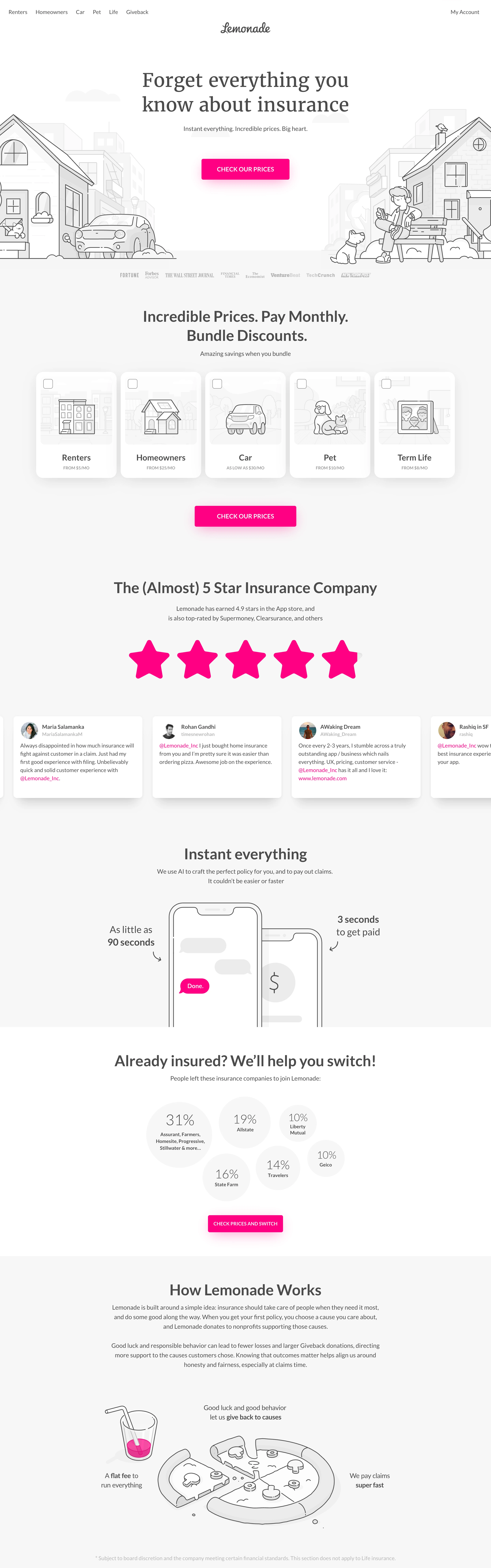
Friendly category disruptor. Insurance made to feel like a picture book: warm, honest, a little cheeky, radically uncluttered.
Colors
White-to-faint-grey canvas (#FFFFFF / #FAFAFA), near-black text, greyscale line art — and ONE color: shocking pink (#FF0083) on every CTA button, review star, and chat bubble. Nothing else is allowed color.
Type
Centered transitional serif headlines at generous size ('Forget everything you know about insurance'), quiet small sans for supporting copy and card labels, bold tracked-caps sans inside the pink CTA pills.
Layout
Strictly centered single column: serif headline, one-line subhead, pink CTA, full-width illustrated street scene bleeding in from both edges. Below: a row of picker cards with checkboxes and per-card line icons, a 5-star pink row, testimonial cards, stat circles cluster, alternating illustrated story sections.
Motion
Gentle. Illustrations may draw-in or drift subtly on scroll; CTA hover deepens the pink. Nothing bouncy enough to disturb the calm.
Texture
Flat paper white with hairline ink strokes and soft grey fills; whisper-light shadows on cards. The saturated pink is the only 'wet' element on the page.
Imagery
Thin-line greyscale illustrations, not photography: houses, cars, pets, and people drawn in a consistent hairline monoline style with sparse soft-grey fills; phone chat UIs as simple line-drawn mockups. Tool: kie-ai Seedream prompted for consistent monoline editorial illustration; skip Pexels entirely. No photos, no color in the artwork.
Don't
No photography, no gradients, no second accent color, no dark sections, no dense copy blocks — the pink loses its shock the moment anything competes with it.
Make it your own
Turn this reference into a useful brief for your project. Copy it into the AI tool you already use.
Add constraintsPreview & edit promptAssembled in your browser. No API key or AI request needed. Changing the fields refreshes the preview.