← Back to library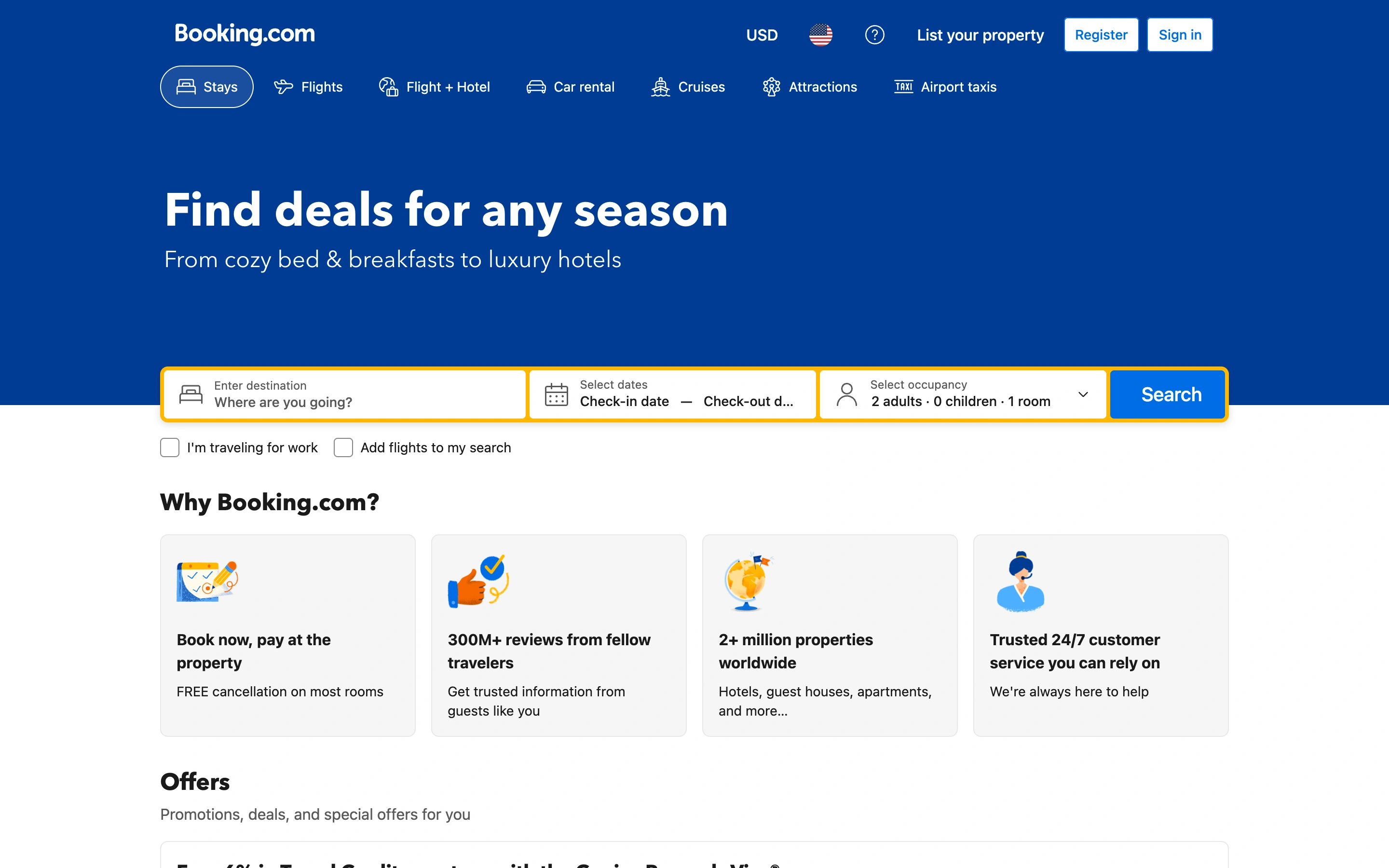
Viewport capture · opening screen Assembled in your browser. No API key or AI request needed. Changing the fields refreshes the preview.
Booking.com — Stay search
Search & DiscoverySee it livebooking.com
Destination, dates, and travelers form one prominent search bar beneath a clear stays headline and travel-category navigation.
Why this pattern works
Multi-field searches that must explain the required inputs before showing results.
Design notes
- Surface
- Booking.com public stays search homepage; sign-in promotion dismissed.
- Navigation
- Account utilities above a row of travel-product tabs.
- Layout
- Blue header and introduction, yellow-framed search row, supporting benefit panels below.
- Density
- Moderate, with the required search fields grouped tightly.
- Color
- Deep blue, white, and yellow search emphasis.
- Type
- Bold sans headline, small form labels, clear primary-button text.
- Pattern
- Group related search constraints into one continuous form with a single submit action.
- States
- Initial unsigned search state; date selection, validation, and search results are not captured.
- Don't
- Do not rely on placeholder text as the only accessible field label.
Make it your own
Turn this reference into a useful brief for your project. Copy it into the AI tool you already use.