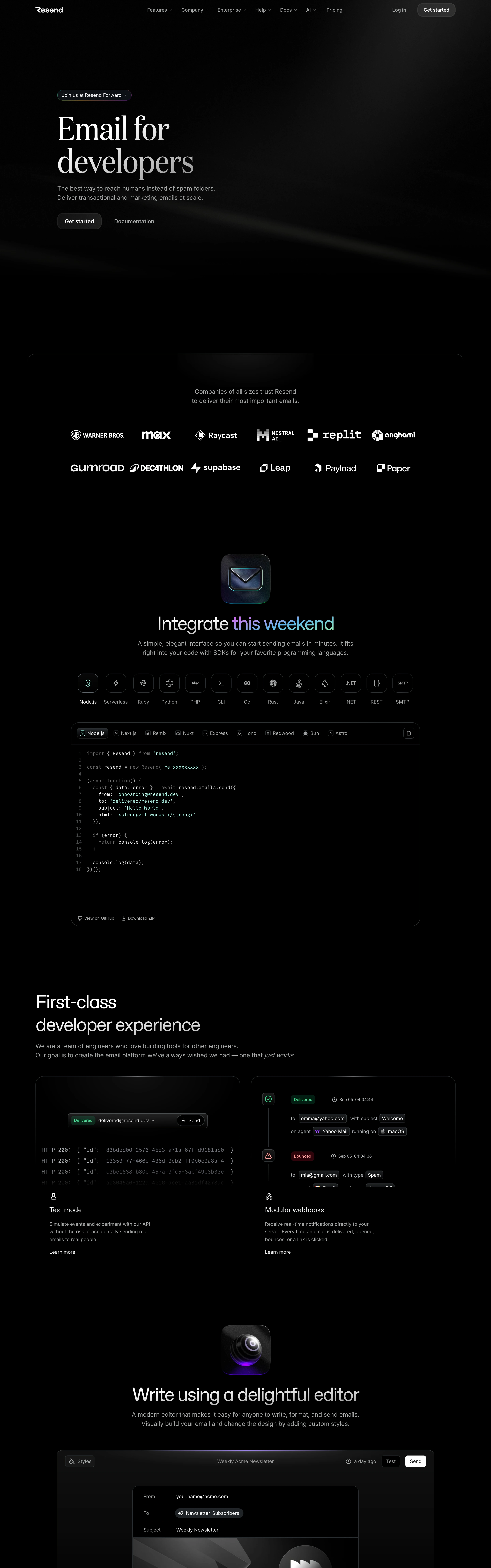
Serious engineering with editorial confidence — a printing-press serif dropped into a terminal. Quietly premium, deeply dark.
Colors
True black canvas, white type, dim grey secondary text, monochrome trusted-by logo wall; accents rationed to moments: a mint-to-cyan gradient phrase, a purple lens glow, and semantic chips inside mockups (green Delivered, red Bounced, amber Complained).
Type
Massive transitional serif for the hero ('Email for developers') against small clean sans everywhere else; monospace for code with muted syntax colours; centered serif returns for section titles ('Write using a delightful editor').
Layout
Left-anchored serif hero with a dark render bleeding off the top-right → centered monochrome logo wall → glowing icon totem + centered claim → SDK/framework icon row → full-width dark code editor → 2-up product mockup panels, each with a short feature note and 'Learn more' link.
Motion
Slow and reverent: glow pulses on icon totems, gradient shimmer on the accent phrase, the code block types itself in. Nothing playful.
Texture
Matte black with soft volumetric glows; hairline dark borders (#1A1A1A) separate panels; renders are smoky, barely lifted from the void.
Imagery
Subtle 3D renders on black: a barely-lit cube array bleeding off the hero corner, glowing rounded-square app icons (envelope, lens) as section totems, and dark code-editor / email-client mockups. Tool: kie-ai Seedream for the smoky dark renders and glowing icon centerpieces; hand-build code blocks with real syntax colouring. No photography, no bright imagery.
Don't
No white backgrounds, no bright saturated palettes, no bubbly rounded friendliness, no sans-only hero — the serif/black tension IS the brand.
Make it your own
Turn this reference into a useful brief for your project. Copy it into the AI tool you already use.
Add constraintsPreview & edit promptAssembled in your browser. No API key or AI request needed. Changing the fields refreshes the preview.