tldraw — Canvas
An infinite whiteboard where the app has almost no chrome: every control floats in small rounded white islands over an edge-to-edge canvas, and the workspace itself is the interface.
Why this pattern works
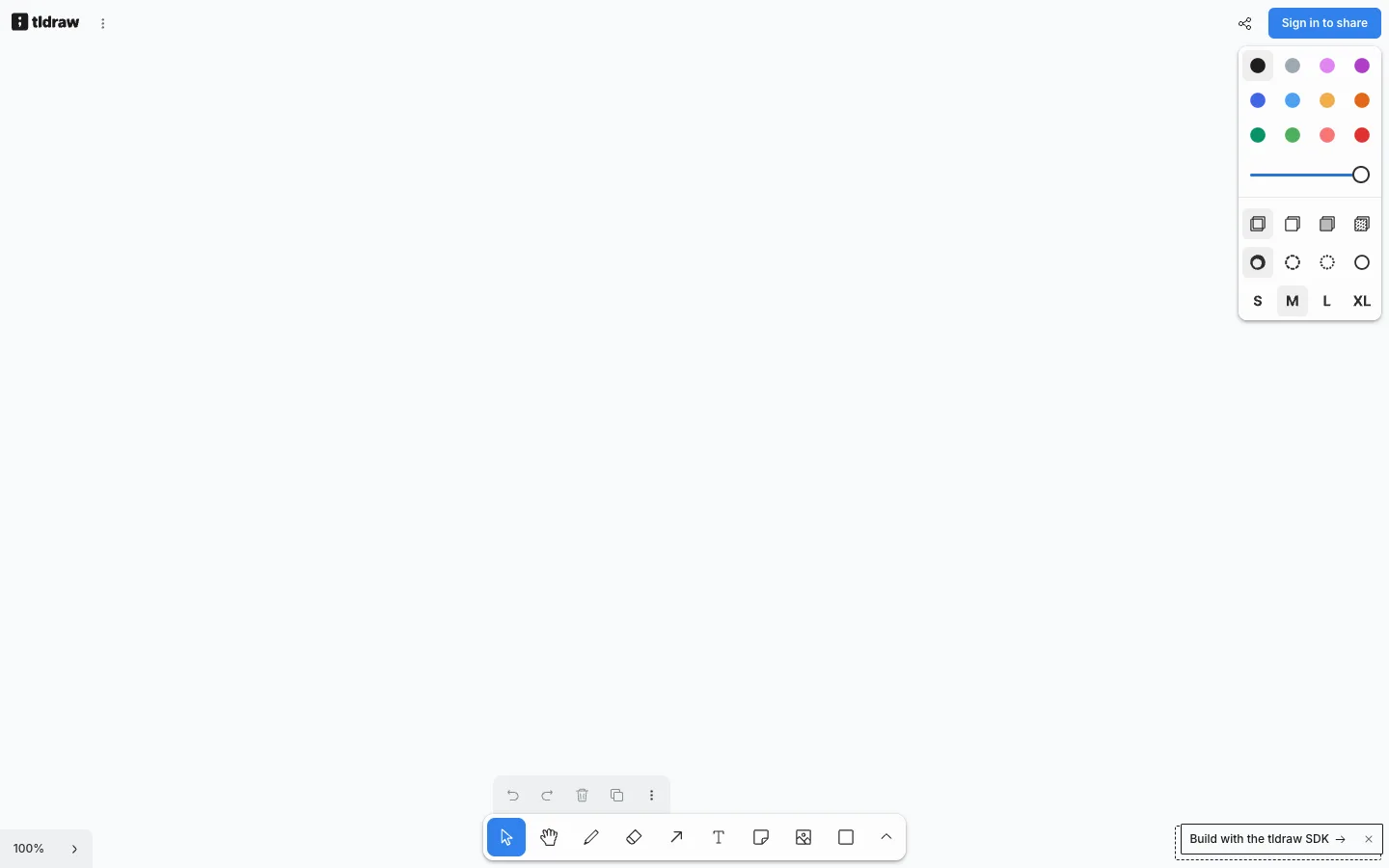
The floating-island chrome system. There is no header bar, no sidebar, no panel column — the canvas runs edge to edge and every piece of UI is a self-contained rounded white card with a soft shadow, pinned to an edge or corner: style panel top-right, tool dock bottom-centre with a smaller undo/redo mini-bar floating just above it, zoom pill bottom-left, brand and share top corners. Each island holds exactly one job and can appear or vanish without any layout reflow. Steal this for any canvas-first tool (whiteboards, maps, diagram editors, image editors): define the canvas as the only layout, then attach controls as shadowed islands with ~8px corner radii and consistent edge margins. Also worth taking: the style panel's picker grammar — a 4-wide swatch grid, a slider, icon-only fill/dash rows, and S/M/L/XL text buttons, all in one narrow card.
Design notes
- Surface
- Empty whiteboard: blank canvas with the default floating panels and an SDK toast
- Navigation
- None in the traditional sense. Top-left holds the wordmark plus an overflow menu icon; top-right holds a share icon and a black 'Sign in to share' pill. Everything else is tool chrome, not navigation.
- Layout
- One layer of pure white canvas, edge to edge, with five floating islands: style panel (top-right), undo/redo mini-bar + main tool dock (bottom-centre, stacked), zoom control (bottom-left), and a dashed-border toast (bottom-right). Consistent ~12-16px margins from the viewport edges.
- Density
- The canvas is 95% empty; the islands are compact and tightly packed inside — the style panel fits a 12-swatch grid, a slider, 8 style pickers, and 4 size buttons in roughly 150x270px.
- Color
- White on white, separated by shadow. Canvas #fff, islands #fff with soft drop shadows and faint borders. Colour lives only in the swatch grid (12 saturated dots: blacks, greys, violets, blues, yellows, orange, greens, reds), the blue slider track, and a light-blue tint behind the active tool. The one filled button is the black sign-in pill.
- Type
- Almost no text. S/M/L/XL size buttons at ~13px bold, the zoom readout '100%' at ~13px, the toast at ~13px medium. The interface is icons; type only appears where a symbol would be ambiguous.
- Pattern
- The bottom-centre tool dock: a single rounded island of ~40px icon-only buttons (select, hand, draw, eraser, arrow, text, note, image, shape, more-chevron) where the active tool gets a light-blue rounded fill — with the secondary actions (undo, redo, delete, duplicate, overflow) split into a separate, visually lighter mini-bar floating above it, so history actions never crowd the tools.
- States
- Active states are quiet tints: the select tool sits on a pale-blue square, the current colour swatch and the M size button get light-grey backings. The SDK toast is styled as a dashed-border island with a close ×, clearly marked as removable. The empty canvas needs no empty-state copy at all — the dock is the invitation.
- Don't
- Don't give the canvas a header bar or dock the panels into fixed sidebars — the moment chrome touches two screen edges the infinite-canvas feel dies. And don't colour the tool icons; colour is data (the swatches), never chrome.
Make it your own
Turn this reference into a useful brief for your project. Copy it into the AI tool you already use.