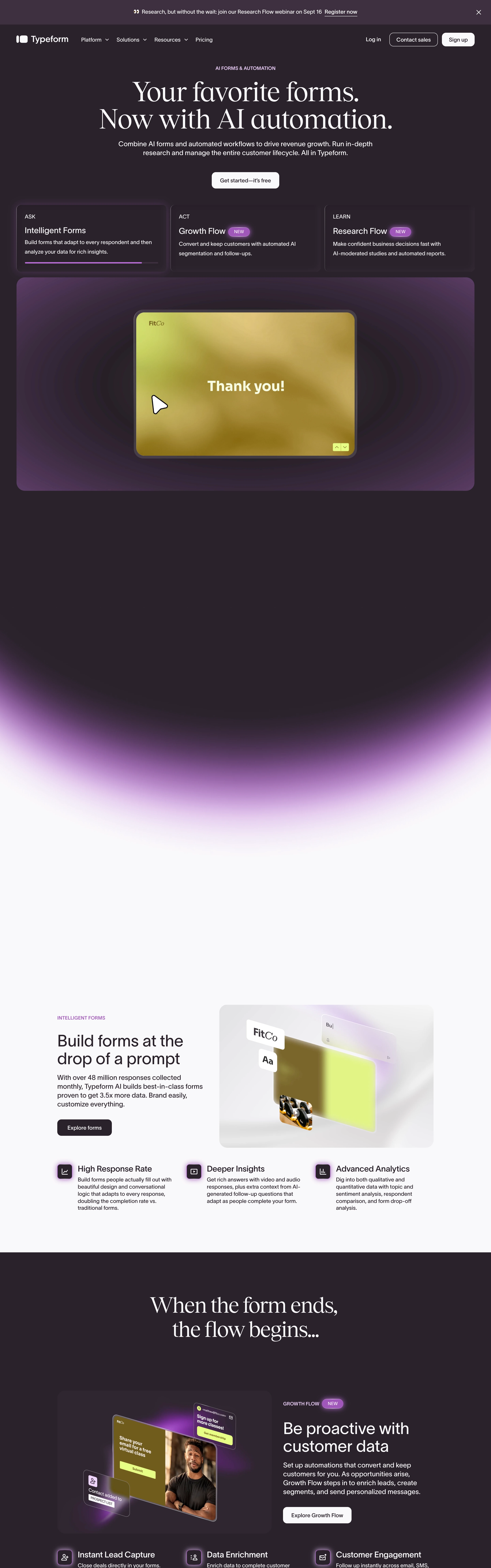
Human, calm, and premium. A form that behaves like a friendly one-on-one conversation instead of a wall of fields. Reduces friction by only ever showing one thing to answer.
Colors
Deep plum / near-black canvas, warm off-white type, a single confident accent (coral or the brand hue) on buttons and choice-cards. High contrast, very few colors.
Type
Large elegant serif for the question prompt (the hero of every screen), clean sans for helper text, choice labels, and letter keys. One big question fills the viewport.
Layout
FLOW-FIRST. One question per full screen, advanced by Enter or click. Thin progress bar pinned top. Each step: big serif question, optional helper line, then the input (short text, or A/B/C multiple-choice cards with keyboard letters, or rating, or email). Persistent OK ✓ + press-Enter cue. Ends on a submit/thank-you screen. Marketing homepage stacks the hero claim over three labelled product cards (Ask / Act / Learn).
Motion
Vertical slide-and-fade between questions (old scrolls up, next rises in), gentle focus states, a progress bar that fills as you advance, subtle button-press feedback.
Texture
Flat premium darkness — soft plum gradient, rounded choice-cards with hairline borders, generous whitespace, no clutter, no imagery competing with the question.
Imagery
Generate: full-screen single-question form frames (short-text, A/B/C multiple-choice cards with letter keys, rating, email capture), a thin top progress bar, an 'OK ✓ press Enter ↵' affordance, and a soft plum-to-charcoal gradient canvas. Tool: build the form UI in code (mostly type + inputs); kie-ai Flux for any abstract plum gradient/backdrop textures.
Don't
No multi-field forms crammed on one screen, no tiny labels, no busy backgrounds, no more than one accent color, no progress hidden from the user. Never show two questions at once.
Make it your own
Turn this reference into a useful brief for your project. Copy it into the AI tool you already use.
Add constraintsPreview & edit promptAssembled in your browser. No API key or AI request needed. Changing the fields refreshes the preview.