← Back to library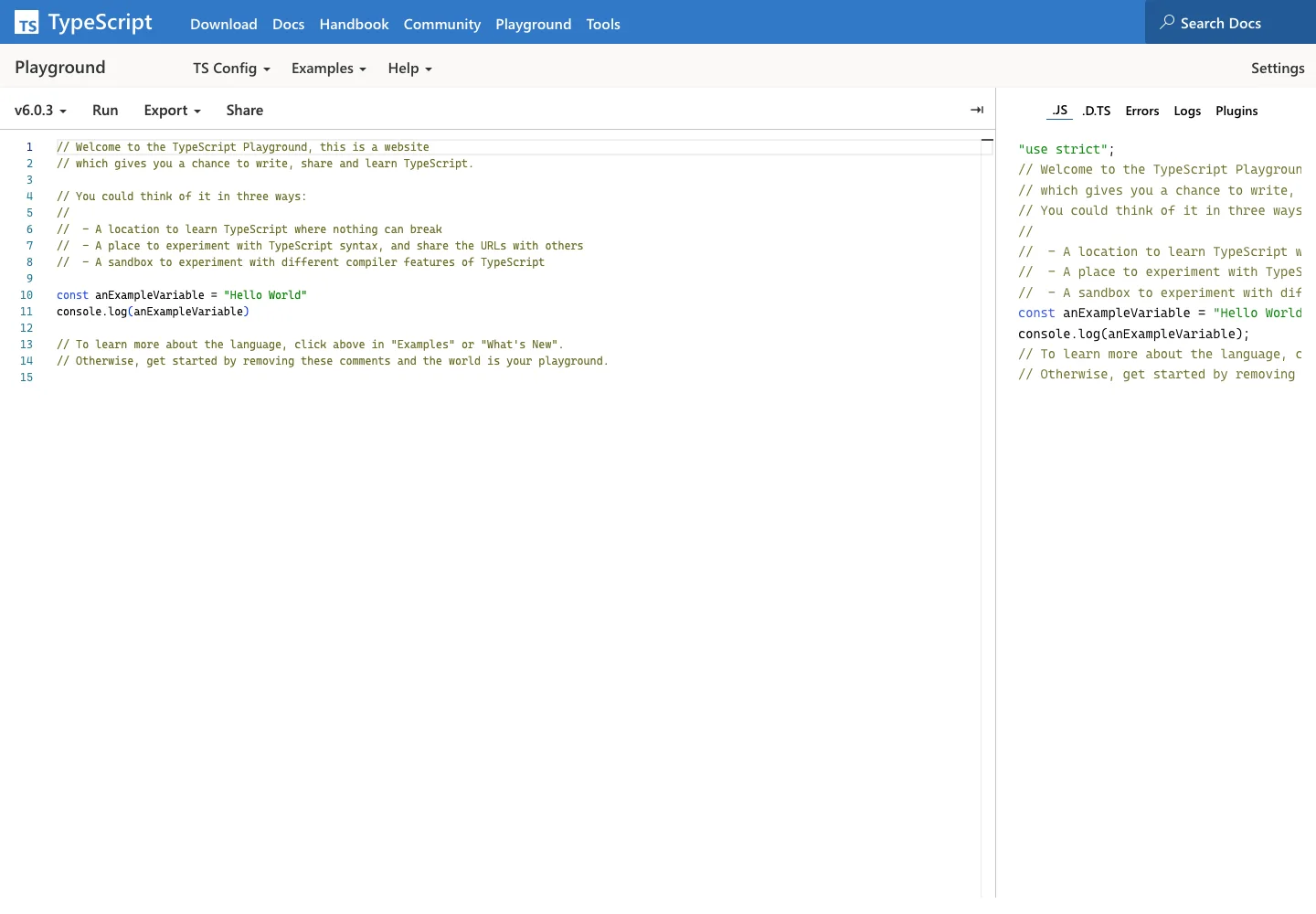
Page excerpt · scroll inside to explore Assembled in your browser. No API key or AI request needed. Changing the fields refreshes the preview.
TypeScript — Playground
Dev ToolsSee it livetypescriptlang.org
A browser language playground pairs editable TypeScript with compiled output.
Why this pattern works
Keep source, generated results, and compiler options within one focused workspace.
Design notes
- Surface
- Playground
- Navigation
- Compiler choices and run actions stay above the workspace; output modes have their own tabs.
- Layout
- Editable TypeScript and generated output occupy neighboring editor panes.
- Density
- Keep the working area large; use compact labels for controls without shrinking the editing text.
- Color
- Light editor surfaces with syntax highlighting and subdued pane separators.
- Type
- Monospaced code contrasts with compact sans-serif interface labels.
- Pattern
- Keep source, generated results, and compiler options within one focused workspace.
- States
- Default public playground example; no project files or private code are loaded.
- Don't
- Do not copy brand assets or sample records. Preserve keyboard access and design empty, loading, and error states for the actual task.
Make it your own
Turn this reference into a useful brief for your project. Copy it into the AI tool you already use.