← Back to library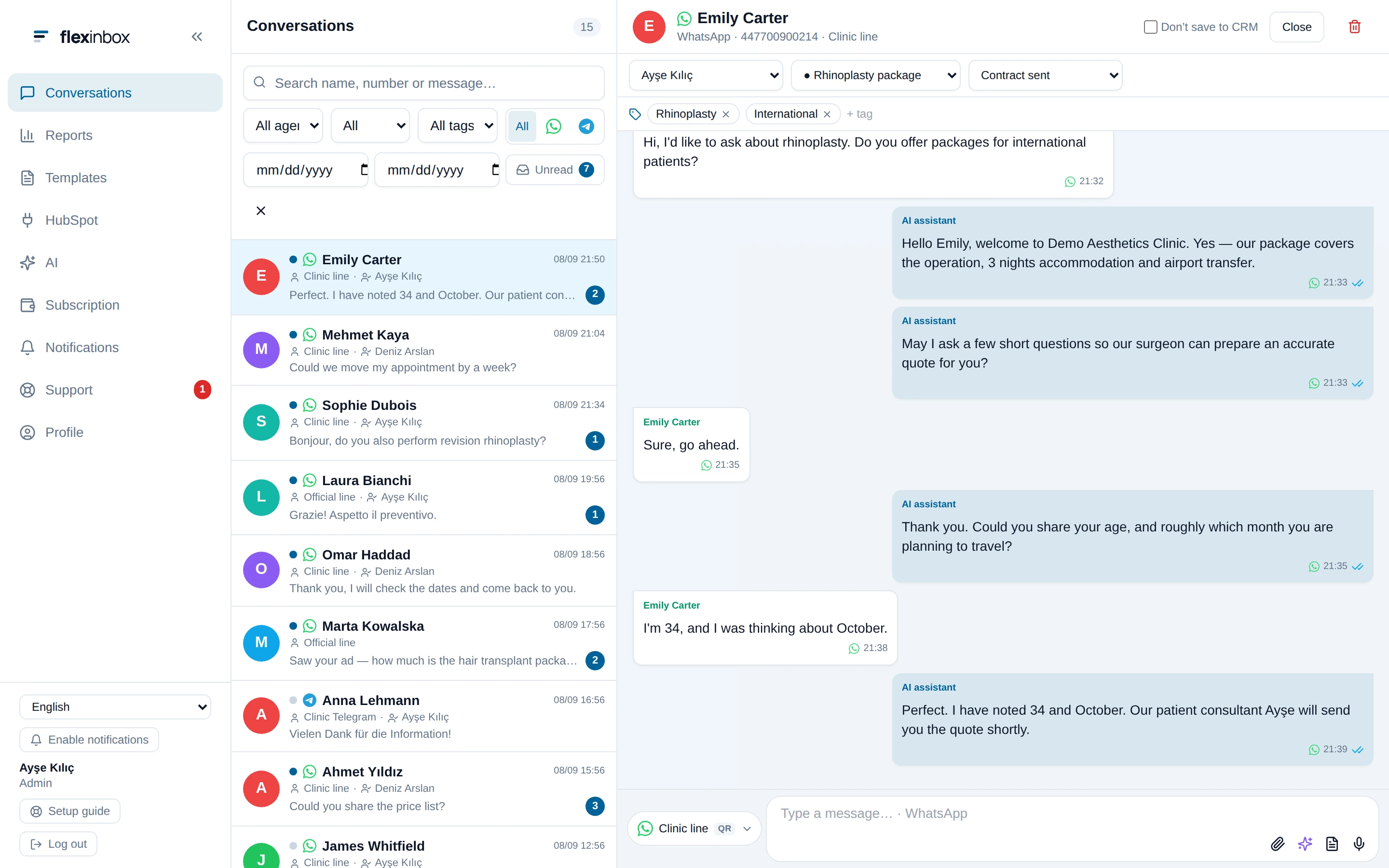
Viewport capture · opening screen Assembled in your browser. No API key or AI request needed. Changing the fields refreshes the preview.
FlexInbox — Conversation and CRM panel
CRM & SalesSee it liveflexinbox.io
A narrow app rail, searchable conversation list, and wide message thread keep the selected customer in context.
Why this pattern works
Keep customer context and ownership controls above the conversation so agents can read and act without switching screens.
Design notes
- Surface
- FlexInbox — Conversation and CRM panel
- Navigation
- A left rail switches between conversations, reports, templates, and CRM tools.
- Layout
- Three columns separate app navigation, customer threads, and a conversation with its record controls above.
- Density
- Dense conversation list beside a spacious message canvas.
- Color
- White and pale gray panels, cyan selection, and pastel avatar circles.
- Type
- Small sans-serif labels keep tools and content visually separate.
- Pattern
- Keep customer context and ownership controls above the conversation so agents can read and act without switching screens.
- States
- This capture records the visible state only. Loading, error, and later workflow states were not verified.
- Don't
- Adapt the interface pattern with original content, branding, and data; do not infer behavior from a still image.
Make it your own
Turn this reference into a useful brief for your project. Copy it into the AI tool you already use.