← Back to library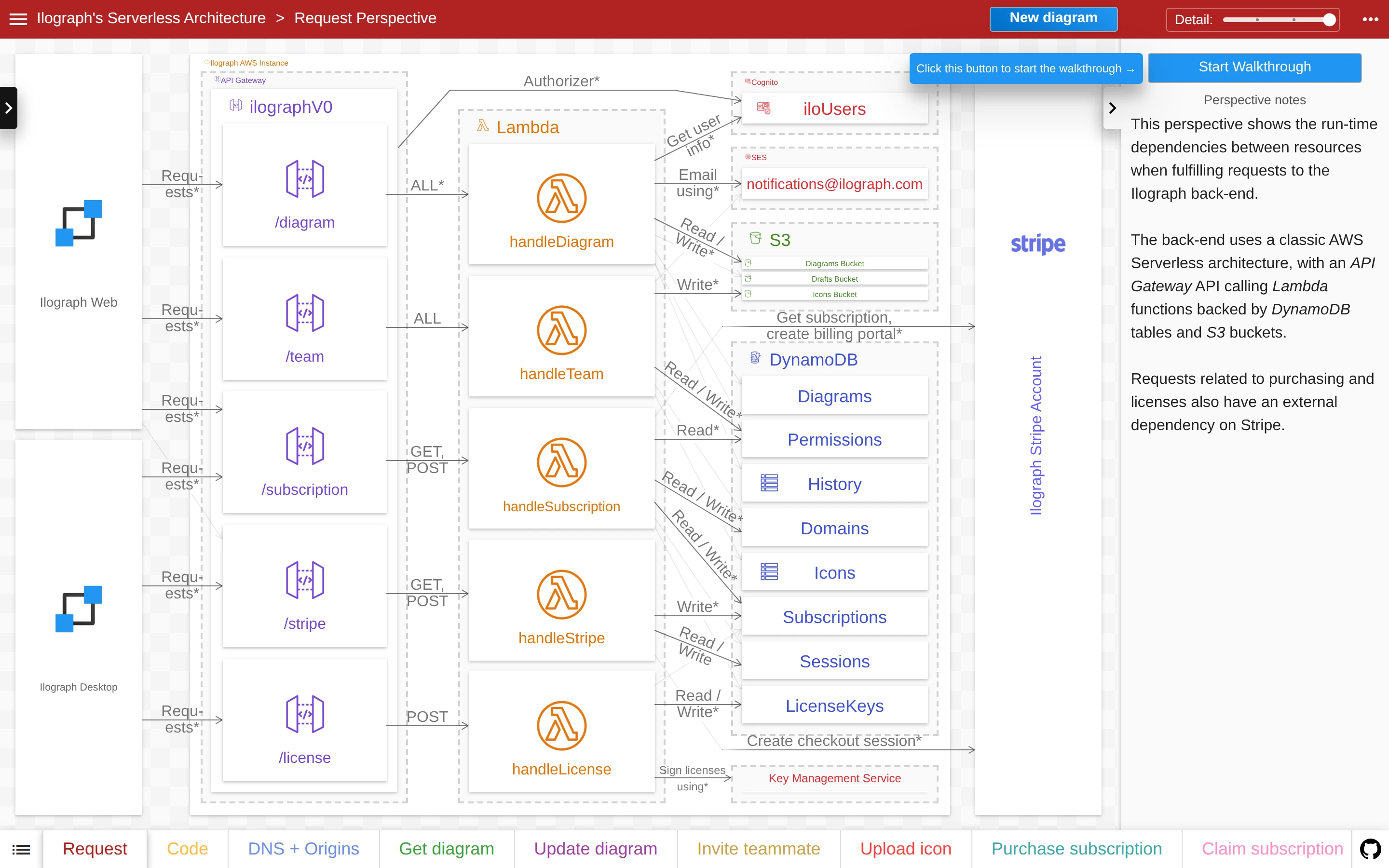
Viewport capture · opening screen Assembled in your browser. No API key or AI request needed. Changing the fields refreshes the preview.
Ilograph — Architecture explorer
Developer ToolsSee it liveapp.ilograph.com
A nested architecture diagram connects request routes, functions, storage, and external services beside explanatory notes.
Why this pattern works
Use named perspectives and nested groups to make a complex system diagram approachable.
Design notes
- Surface
- Ilograph — Architecture explorer
- Navigation
- Perspective tabs run along the bottom, with detail and walkthrough controls above.
- Layout
- The graph fills the main pane while a narrow right column explains the selected perspective.
- Density
- High graph density is organized by nested containers and labeled connectors.
- Color
- White canvas, muted orange and purple service labels, and a red top bar.
- Type
- Small sans-serif labels keep tools and content visually separate.
- Pattern
- Use named perspectives and nested groups to make a complex system diagram approachable.
- States
- This capture records the visible state only. Loading, error, and later workflow states were not verified.
- Don't
- Adapt the interface pattern with original content, branding, and data; do not infer behavior from a still image.
Make it your own
Turn this reference into a useful brief for your project. Copy it into the AI tool you already use.