← Back to library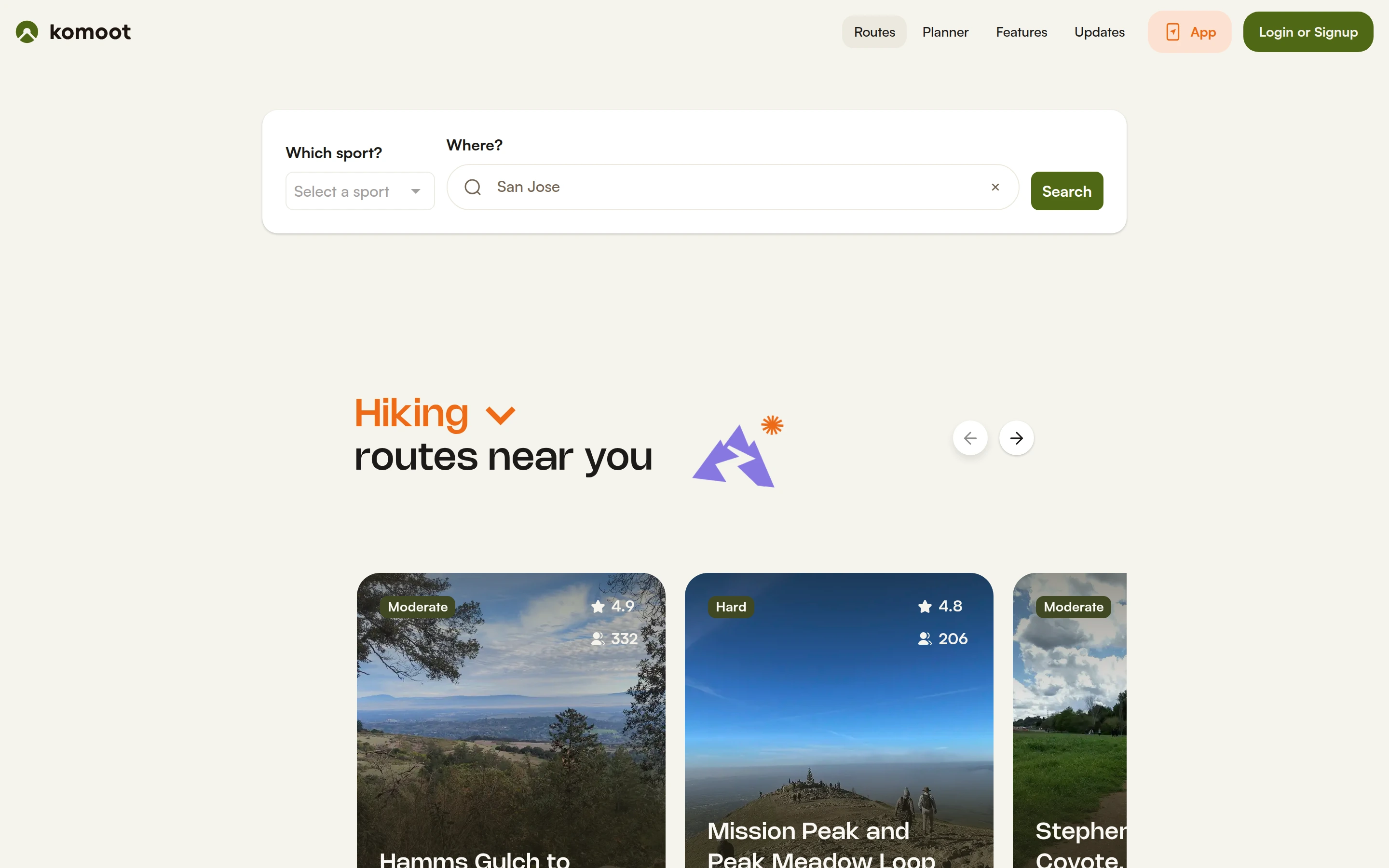
Viewport capture · opening screen Assembled in your browser. No API key or AI request needed. Changing the fields refreshes the preview.
Komoot — Route discovery
Maps & TravelSee it livekomoot.com
A sport-and-location search sits above large nearby route cards with ratings and difficulty labels.
Why this pattern works
Ask for the activity and location together, then show routes with practical comparison badges.
Design notes
- Surface
- Komoot — Route discovery
- Navigation
- A slim top navigation separates route discovery and planning.
- Layout
- The main search panel leads into a horizontal set of image-led route recommendations.
- Density
- Low density in search; compact badges and labels on the cards.
- Color
- Warm cream, olive green, orange, and landscape photography.
- Type
- Small sans-serif labels keep tools and content visually separate.
- Pattern
- Ask for the activity and location together, then show routes with practical comparison badges.
- States
- This capture records the visible state only. Loading, error, and later workflow states were not verified.
- Don't
- Adapt the interface pattern with original content, branding, and data; do not infer behavior from a still image.
Make it your own
Turn this reference into a useful brief for your project. Copy it into the AI tool you already use.