← Back to library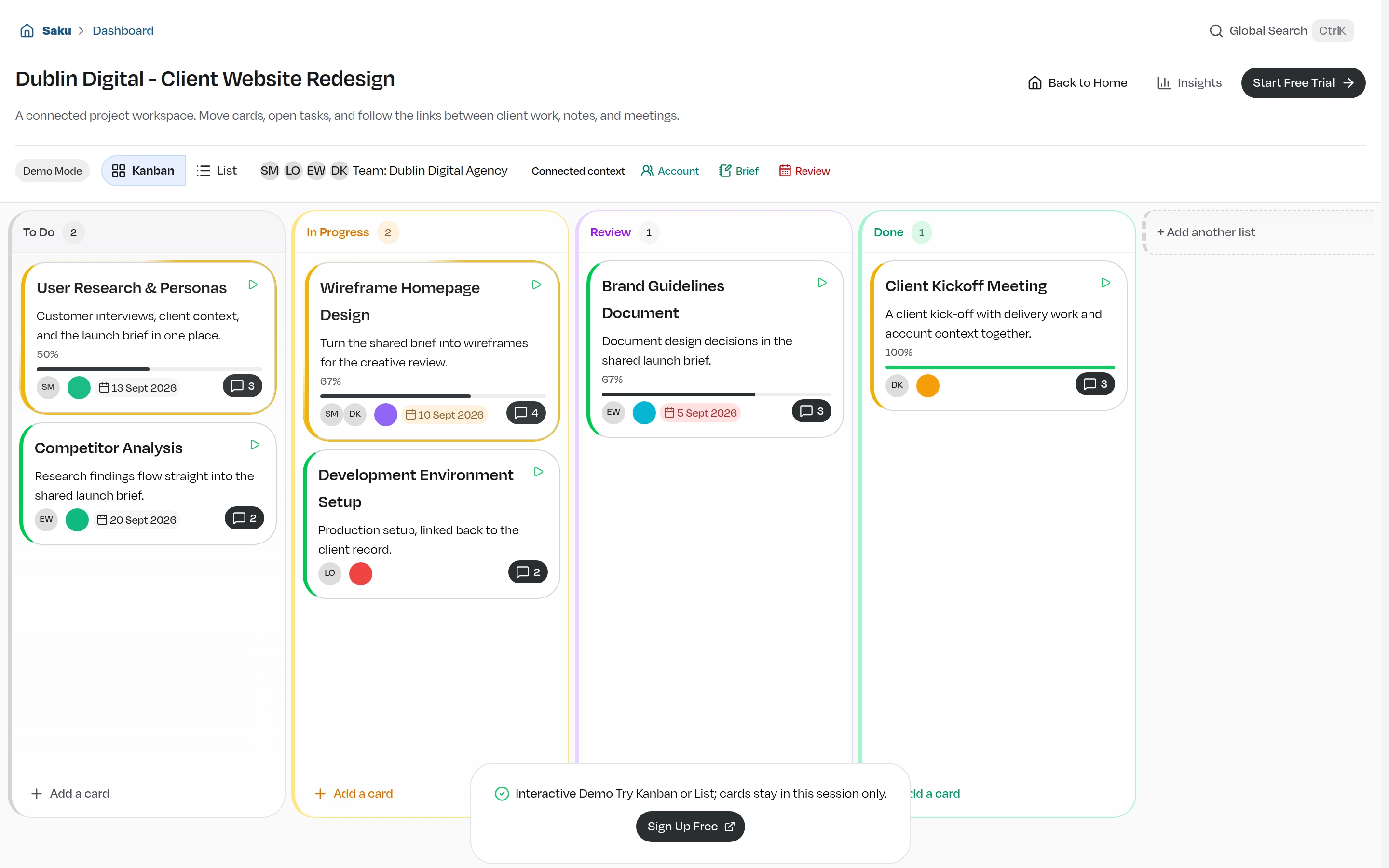
Viewport capture · opening screen Assembled in your browser. No API key or AI request needed. Changing the fields refreshes the preview.
Saku — Team workspace demo
Project ManagementSee it livesaku.ie
A client project board groups detailed task cards into To Do, In Progress, Review, and Done columns.
Why this pattern works
Keep board status, task detail, and linked project records in one visible project context.
Design notes
- Surface
- Saku — Team workspace demo
- Navigation
- Project-level views and connected records sit in a toolbar beneath the project title.
- Layout
- Four tall columns align task cards with progress, dates, and participant chips.
- Density
- Moderately dense cards retain room for descriptions and metadata.
- Color
- White surfaces with pastel column outlines and small status accents.
- Type
- Small sans-serif labels keep tools and content visually separate.
- Pattern
- Keep board status, task detail, and linked project records in one visible project context.
- States
- This capture records the visible state only. Loading, error, and later workflow states were not verified.
- Don't
- Adapt the interface pattern with original content, branding, and data; do not infer behavior from a still image.
Make it your own
Turn this reference into a useful brief for your project. Copy it into the AI tool you already use.