← Back to library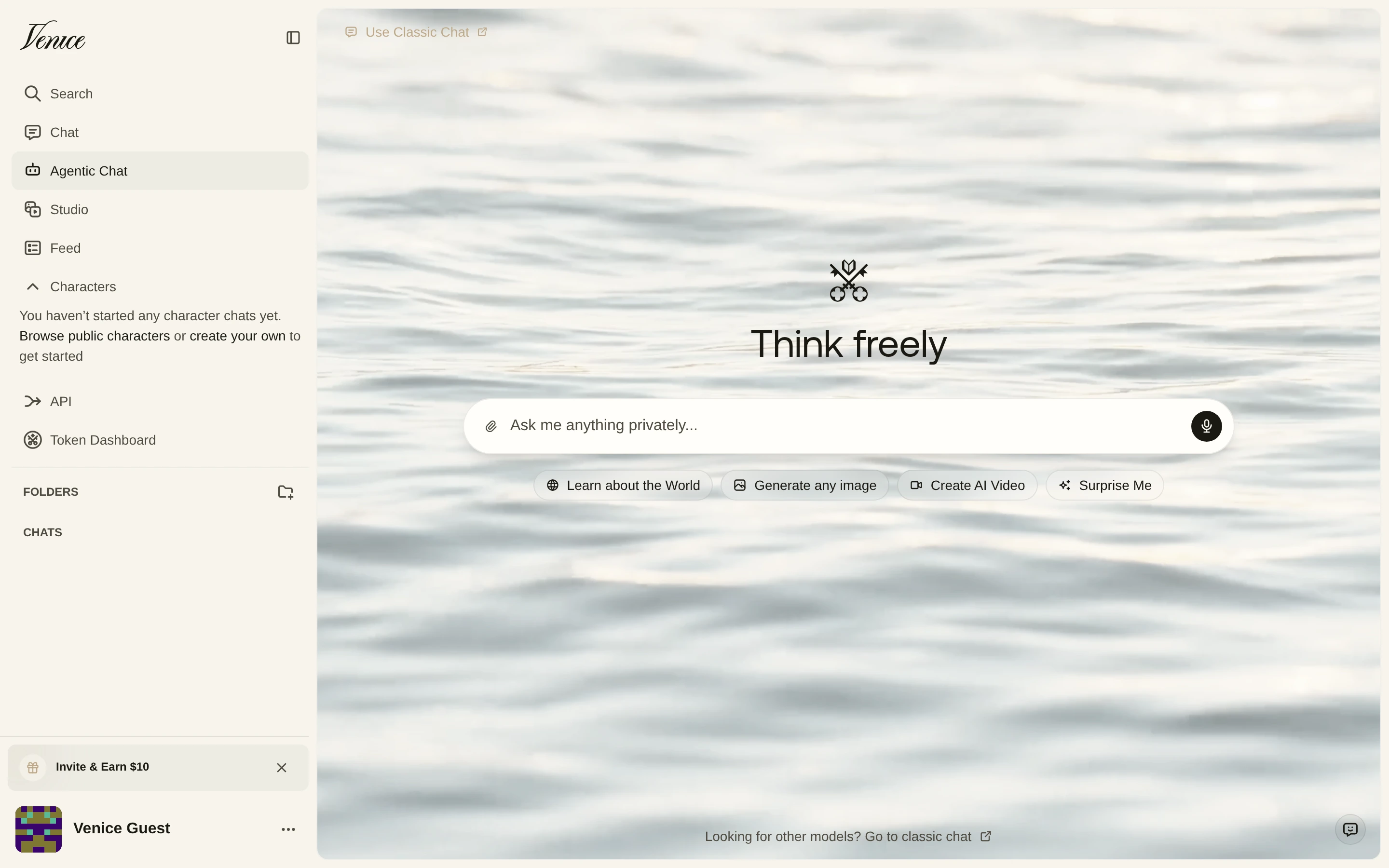
Viewport capture · opening screen Assembled in your browser. No API key or AI request needed. Changing the fields refreshes the preview.
Venice — Chat workspace
AI & AssistantsSee it livevenice.ai
A centered private-chat prompt sits over a pale water background, with chat modes and folders in a left rail.
Why this pattern works
Use a quiet scene and a simple prompt to distinguish a chat workspace while keeping navigation familiar.
Design notes
- Surface
- Venice — Chat workspace
- Navigation
- The sidebar separates search, chat, studio, feed, and character tools.
- Layout
- A wide scene-backed canvas centers one input and a row of starter actions.
- Density
- Low density focuses attention on the prompt.
- Color
- Cream sidebar, pale photographic water, and dark text.
- Type
- Small sans-serif labels keep tools and content visually separate.
- Pattern
- Use a quiet scene and a simple prompt to distinguish a chat workspace while keeping navigation familiar.
- States
- This capture records the visible state only. Loading, error, and later workflow states were not verified.
- Don't
- Adapt the interface pattern with original content, branding, and data; do not infer behavior from a still image.
Make it your own
Turn this reference into a useful brief for your project. Copy it into the AI tool you already use.