← Back to library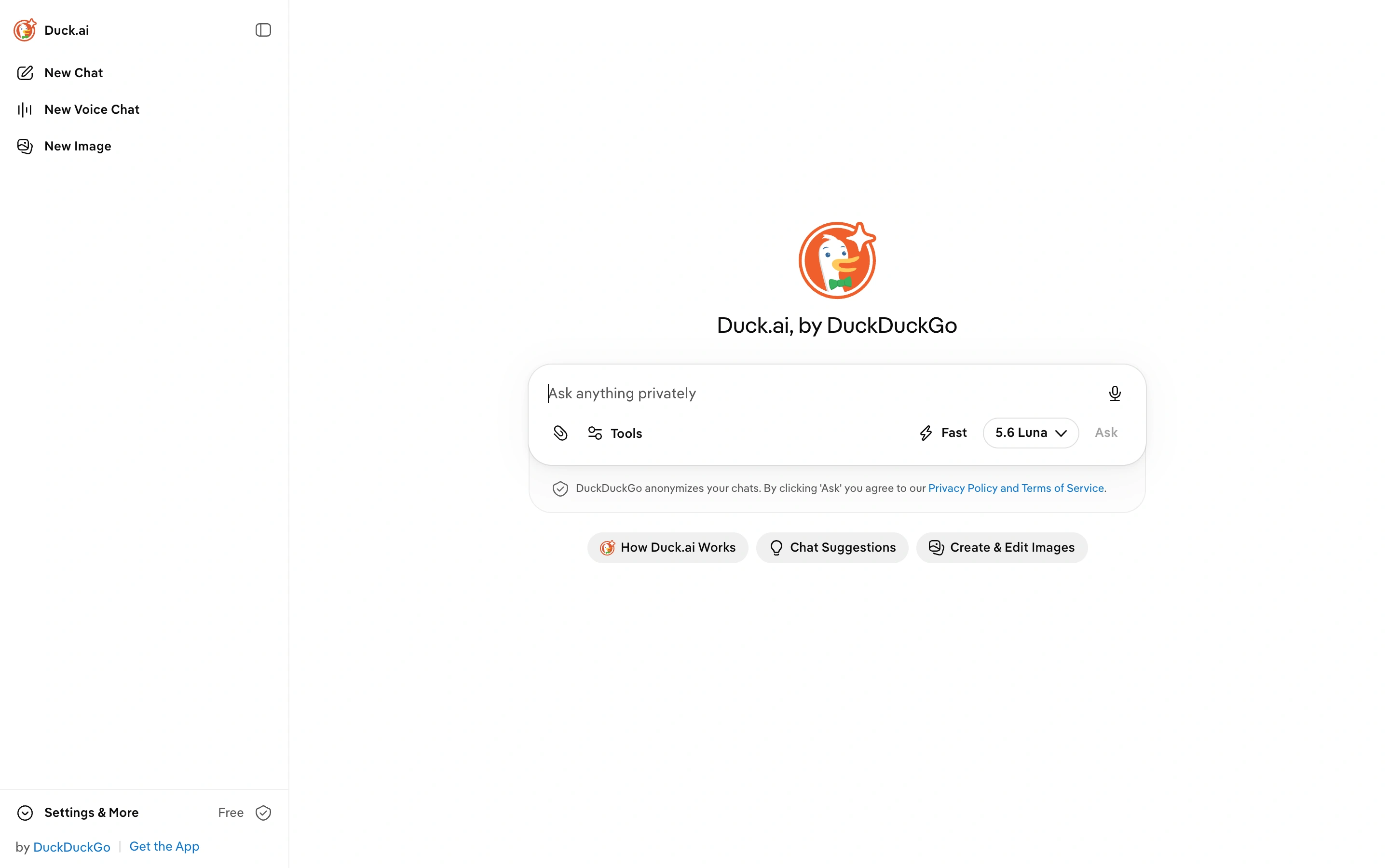
Viewport capture · opening screen Assembled in your browser. No API key or AI request needed. Changing the fields refreshes the preview.
Duck.ai — New chat
AI ChatSee it liveduck.ai
A public assistant starting screen with a central composer and a small persistent sidebar.
Why this pattern works
Expose alternate input modes through a quiet sidebar while keeping the main composer focused.
Design notes
- Surface
- A public assistant starting screen with a central composer and a small persistent sidebar.
- Navigation
- The sidebar groups new chat, voice and image entry points, with settings below.
- Layout
- An open central canvas places the brand above the composer and suggested help actions.
- Density
- Low density with one dominant input.
- Color
- White and light grey with an orange brand icon.
- Type
- Simple sans-serif interface labels.
- Pattern
- Expose alternate input modes through a quiet sidebar while keeping the main composer focused.
- States
- Empty new conversation; no message sent or image generated.
- Don't
- Adapt the layout to your own product and supported capabilities; write your own examples and keep important actions clearly labeled.
Make it your own
Turn this reference into a useful brief for your project. Copy it into the AI tool you already use.