← Back to library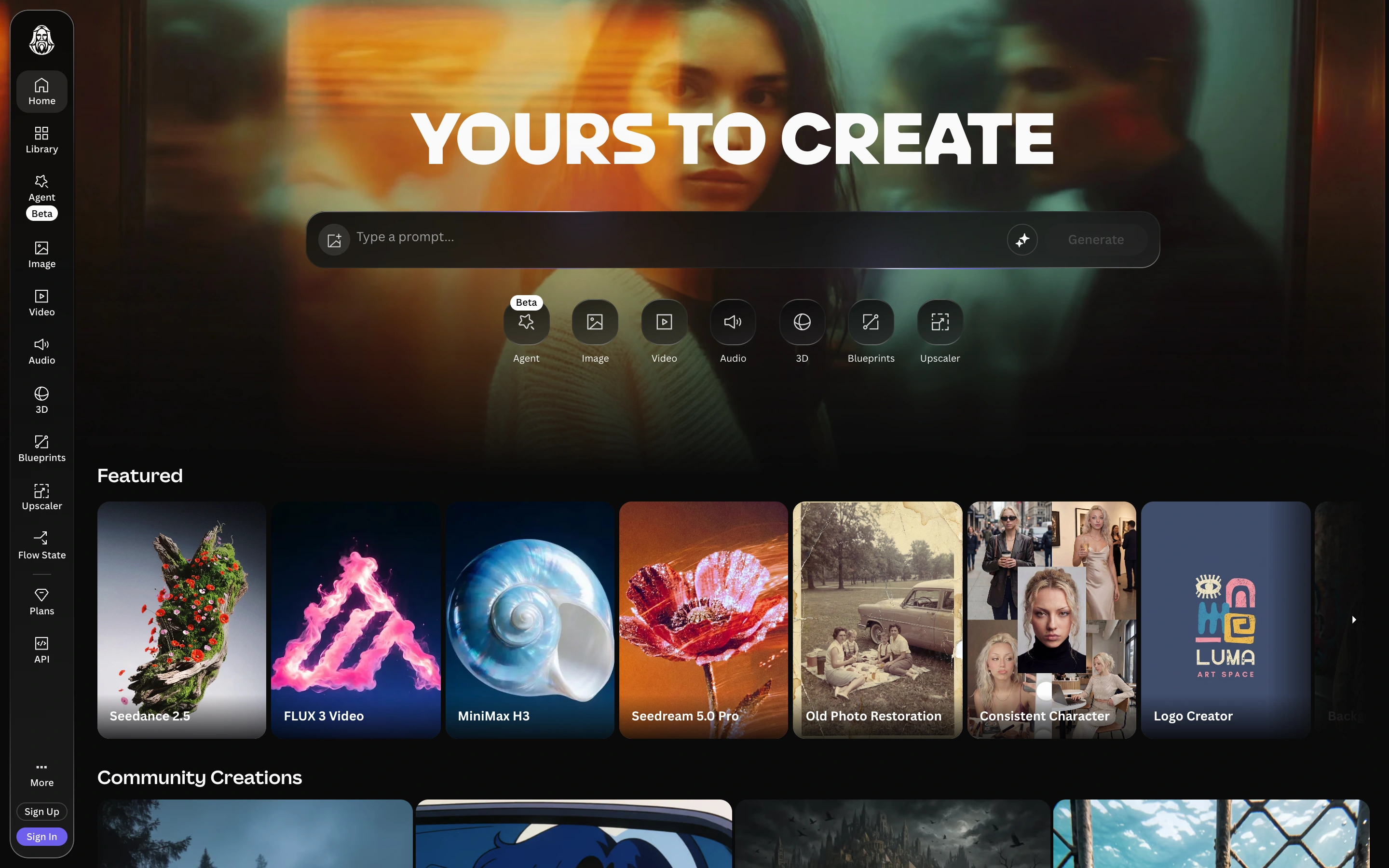
Viewport capture · opening screen Assembled in your browser. No API key or AI request needed. Changing the fields refreshes the preview.
Leonardo — Creative home
Creative ToolsSee it liveapp.leonardo.ai
A signed-out creative home with a prompt composer, tool shortcuts and visual discovery cards.
Why this pattern works
Combine a prominent prompt composer with examples that help users choose a creative task.
Design notes
- Surface
- A signed-out creative home with a prompt composer, tool shortcuts and visual discovery cards.
- Navigation
- A narrow left sidebar lists creation tools and library routes.
- Layout
- A wide prompt area sits above featured tools and a community-image gallery.
- Density
- Moderate density with image-led cards and compact controls.
- Color
- Dark surfaces with varied colorful artwork.
- Type
- Bold introductory text and small functional labels.
- Pattern
- Combine a prominent prompt composer with examples that help users choose a creative task.
- States
- Public signed-out home; no generation submitted or private library accessed.
- Don't
- Adapt the layout to your own product and supported capabilities; write your own examples and keep important actions clearly labeled.
Make it your own
Turn this reference into a useful brief for your project. Copy it into the AI tool you already use.