← Back to library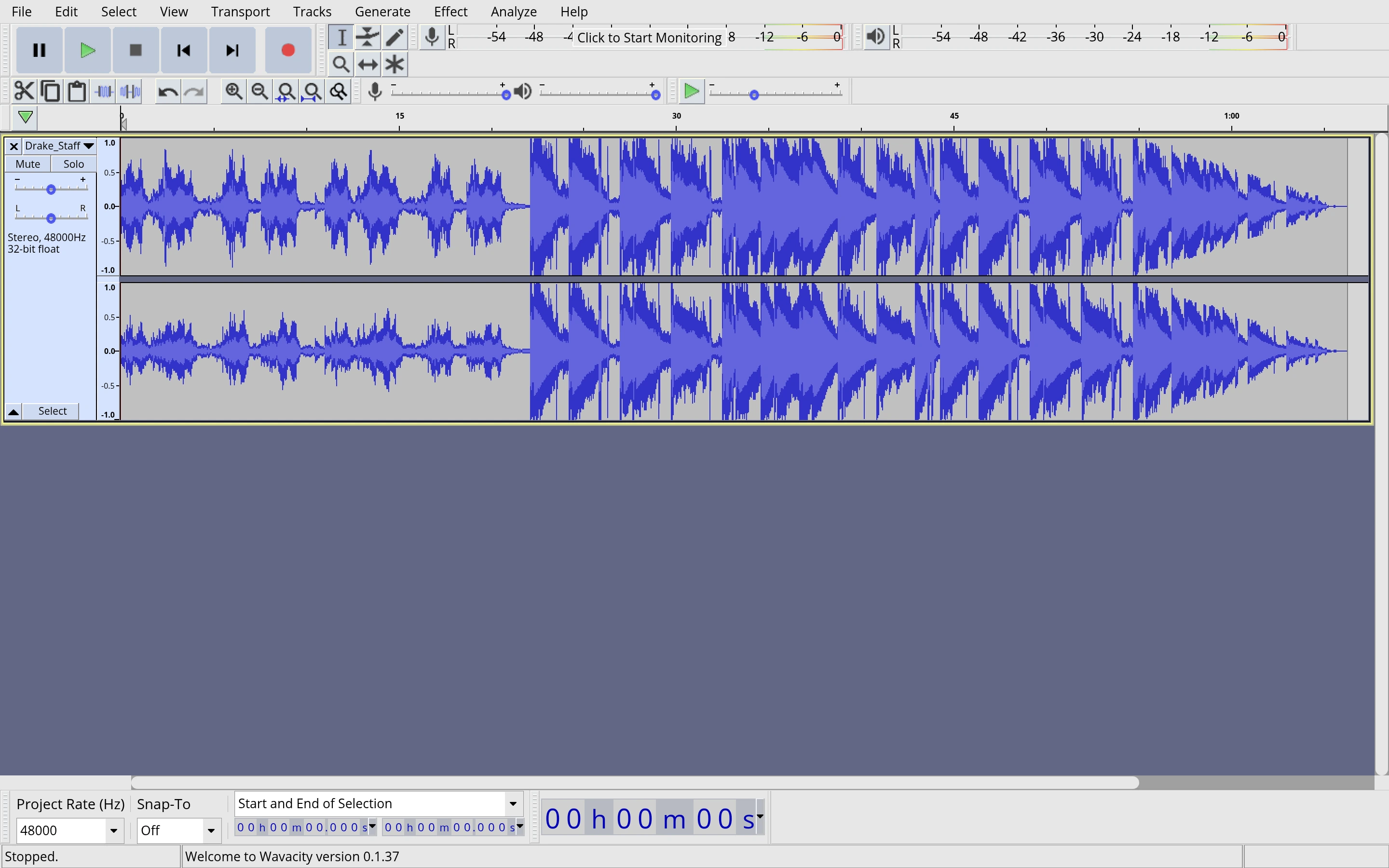
Viewport capture · opening screen Assembled in your browser. No API key or AI request needed. Changing the fields refreshes the preview.
Wavacity — Audio workspace
Audio & VideoSee it livewavacity.com
A stereo waveform spans the editor beneath transport controls, with track settings at the left and timing fields below.
Why this pattern works
Keep playback, track settings, and precise timing available around the same waveform canvas.
Design notes
- Surface
- Wavacity — Audio workspace
- Navigation
- Desktop-style menus and compact icon toolbars group editing and playback commands.
- Layout
- A two-channel waveform fills the upper workspace while a bottom strip holds project rate and selection timing.
- Density
- Dense controls serve detailed audio work.
- Color
- Gray toolbars, blue-purple waveforms, and a muted workspace.
- Type
- Small sans-serif labels keep tools and content visually separate.
- Pattern
- Keep playback, track settings, and precise timing available around the same waveform canvas.
- States
- This capture records the visible state only. Loading, error, and later workflow states were not verified.
- Don't
- Adapt the interface pattern with original content, branding, and data; do not infer behavior from a still image.
Make it your own
Turn this reference into a useful brief for your project. Copy it into the AI tool you already use.