Separate document management from editing and keep import/export near the workspace boundary.
Design notes
Surface
Markdown editor
Navigation
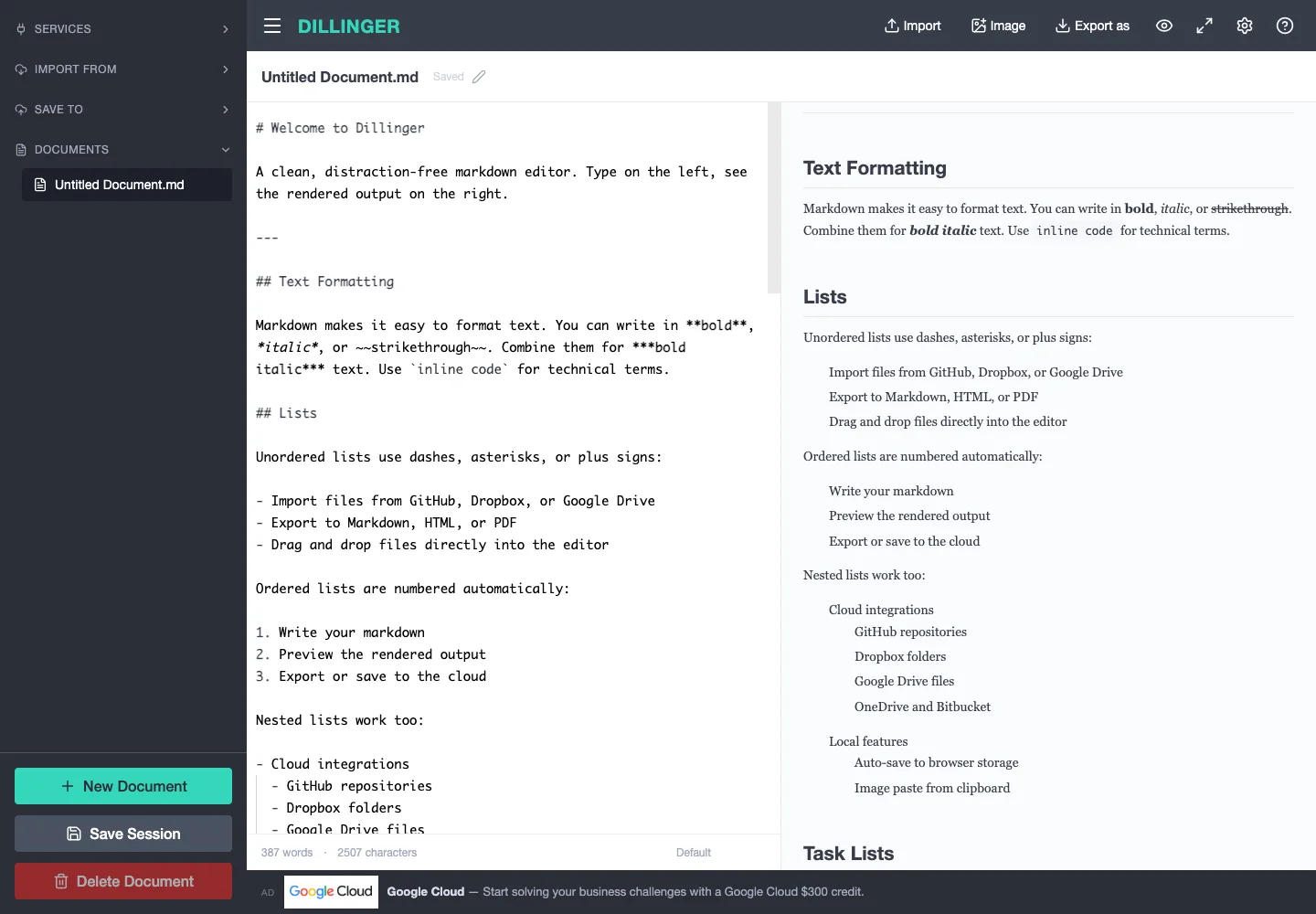
Import, export, and configuration actions share the top bar; document actions stay in the rail.
Layout
A dark left rail holds document actions; the main area splits source from formatted output.
Density
Primary content has the most space; repeated rows and secondary navigation use a compact, consistent rhythm.
Color
Dark slate navigation, white editing surfaces, and a teal new-document action.
Type
Monospaced source contrasts with proportional preview typography and compact navigation labels.
Pattern
Separate document management from editing and keep import/export near the workspace boundary.
States
Public editor with its supplied welcome document and preview.
Don't
Adapt the interaction pattern to your own product. Do not copy brand assets, sample identities, proprietary text, or assume unseen states. Specify keyboard behavior, loading, empty, error, and narrow-screen layouts for your implementation.
Make it your own
Turn this reference into a useful brief for your project. Copy it into the AI tool you already use.
Add constraintsPreview & edit promptAssembled in your browser. No API key or AI request needed. Changing the fields refreshes the preview.