← Back to library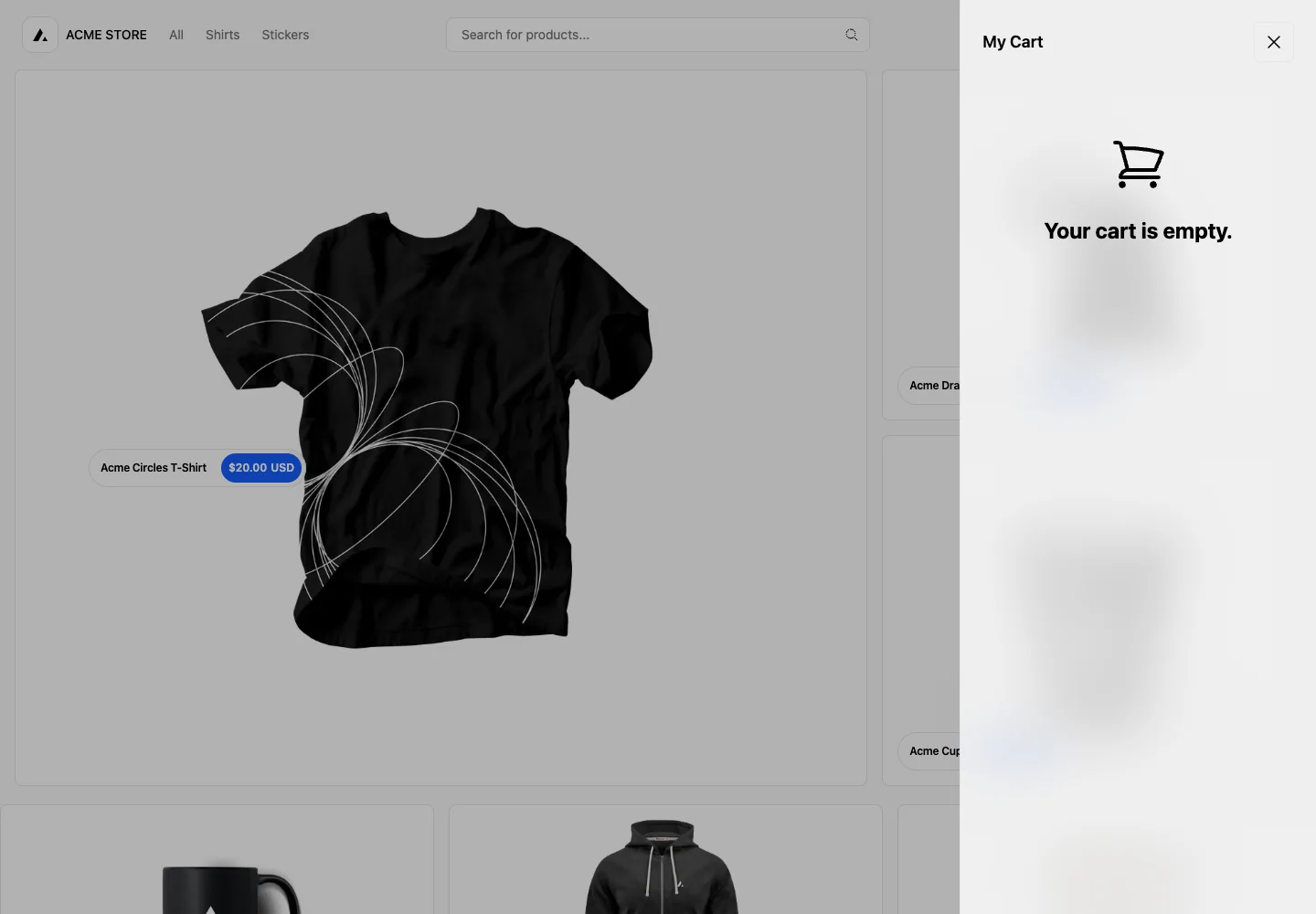
Page excerpt · scroll inside to explore Assembled in your browser. No API key or AI request needed. Changing the fields refreshes the preview.
Next.js Commerce — Empty cart
CommerceSee it livedemo.vercel.store
An empty cart opens as a right-hand drawer, preserving the shopper’s place in the store behind a dimmed backdrop.
Why this pattern works
Use a closeable drawer for a reversible side task, with a concise empty state rather than an empty table.
Design notes
- Surface
- Empty cart drawer opened from the storefront
- Navigation
- Explicit close icon in the top-right of the drawer. The store remains visible behind it.
- Layout
- A full-height narrow drawer on the right; centered cart icon and empty-state text.
- Density
- Sparse empty state with ample whitespace.
- Color
- Neutral drawer, black icon and heading, gray scrim behind.
- Type
- Short bold empty-state heading with a small cart title above.
- Pattern
- Retain browsing context while showing cart state in a focused overlay.
- States
- Cart is empty. This is a separate empty-state branch, not a completed checkout.
- Don't
- Do not trap the user in an empty cart; close must work with Escape and keyboard focus must return to its trigger.
Make it your own
Turn this reference into a useful brief for your project. Copy it into the AI tool you already use.