← Back to library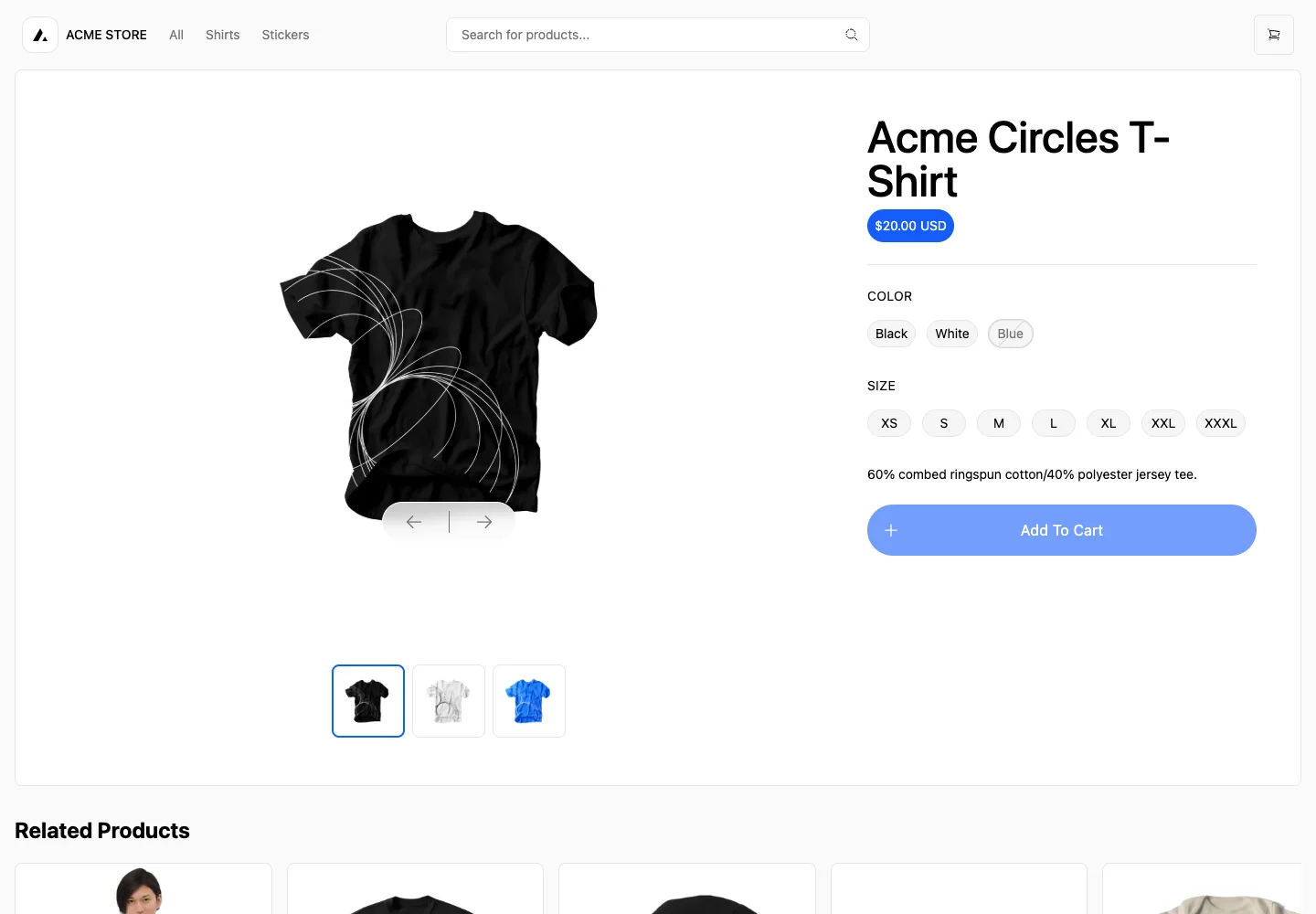
Page excerpt · scroll inside to explore Assembled in your browser. No API key or AI request needed. Changing the fields refreshes the preview.
Next.js Commerce — Product details
CommerceSee it livedemo.vercel.store
A large product image shares the screen with a compact buying panel: price, variants, and one add-to-cart action.
Why this pattern works
Use a stable product gallery next to explicit variant controls. Show unavailable choices and keep the purchase action close to the selected options.
Design notes
- Surface
- Product detail with color and size options
- Navigation
- Shared store navigation and search with cart entry at the top.
- Layout
- Large image gallery occupies the left two-thirds; title, price, variant controls, and action occupy the right.
- Density
- Generous gallery; compact aligned option groups.
- Color
- White background, black text, blue price and call to action.
- Type
- Large product title; compact uppercase group labels and readable pill options.
- Pattern
- Make option selection visible and show why the action is unavailable before valid choices are made.
- States
- Unselected size with a subdued add-to-cart control; unavailable color is visibly muted.
- Don't
- Do not preselect unavailable variants or present a disabled action without explaining what the shopper needs to choose.
Make it your own
Turn this reference into a useful brief for your project. Copy it into the AI tool you already use.