← Back to library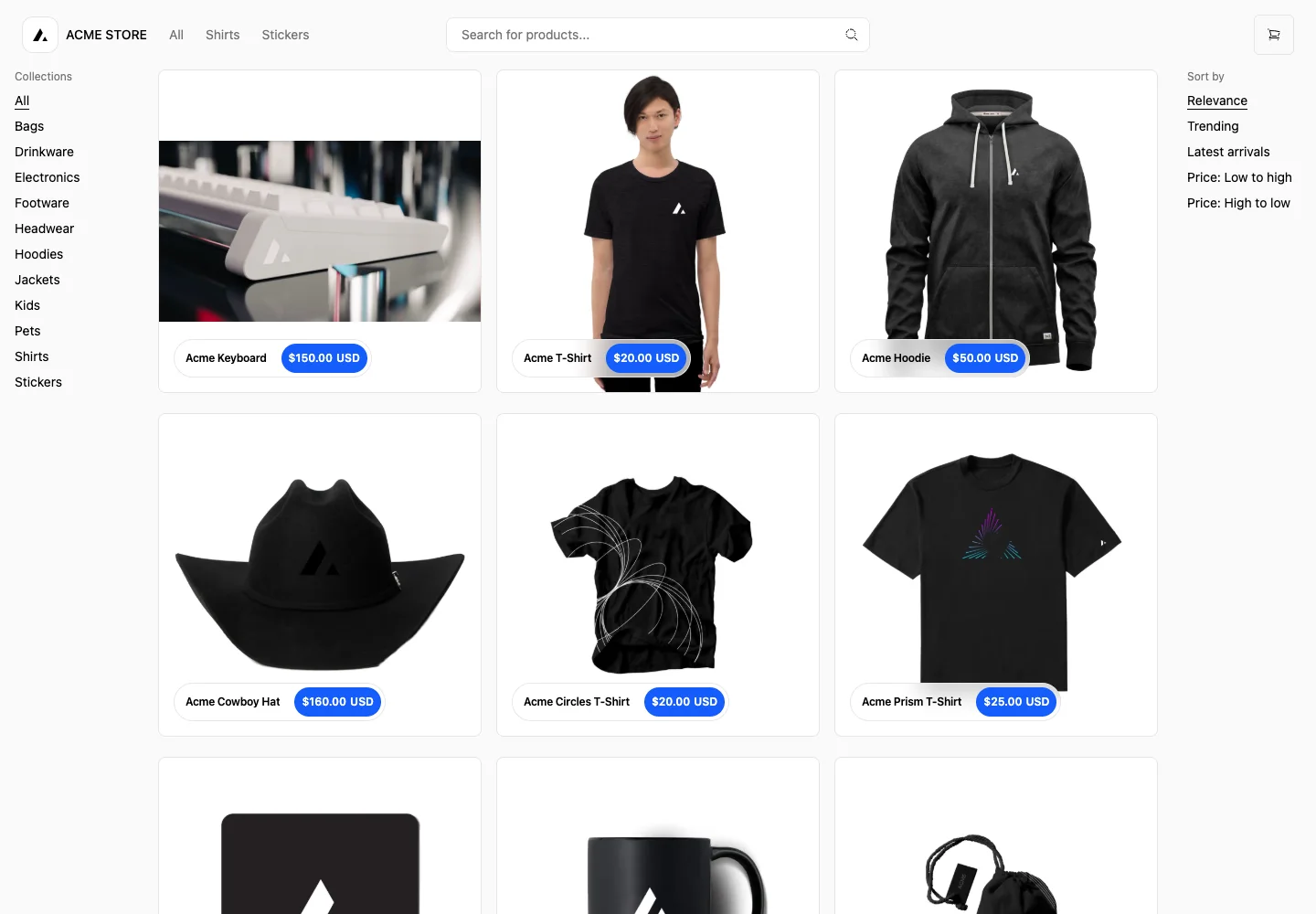
Page excerpt · scroll inside to explore Assembled in your browser. No API key or AI request needed. Changing the fields refreshes the preview.
Next.js Commerce — Product search
CommerceSee it livedemo.vercel.store
A product grid sits between category navigation and sorting, keeping the merchandise as the main visual focus.
Why this pattern works
Keep category choices and sorting close to results while leaving most of the screen for product imagery.
Design notes
- Surface
- Product search and category browse
- Navigation
- Global navigation and search above; collections at left and sort order at right.
- Layout
- Three-column product grid between two narrow text rails.
- Density
- Open spacing around large product images; small compact category links.
- Color
- Near-white base with black typography and a blue price badge.
- Type
- Product names use short, medium-weight labels; prices are contained in small high-contrast pills.
- Pattern
- Separate the shopper’s category choice from sort order so each has a predictable place.
- States
- Populated sample catalog. Search-empty and loading states are not shown.
- Don't
- Do not let filters compete visually with products, and preserve selected filters on back navigation.
Make it your own
Turn this reference into a useful brief for your project. Copy it into the AI tool you already use.